This page answers three questions about the texts your campaigns have sent: how many went out and when, whether they were delivered, and exactly which text went to which number. It stacks three cards, one for each question.
To change what a campaign sends, see SMS Auto-Responder Campaign Creation.
You need to be an admin, or to have been given access to the Reporting module, to open Reports. These pages are in the classic Reports area. The newer Analytics area is a separate set of reports.
Where to find it
- Click Reports in Echo’s main menu.
- In the left menu, open the Autoresponders group and click Sent Messages.
- Pick a date range and, if you need to, a time zone at the top of the page. Open Sources to choose which of your sources to include.
- Click Run Report on the card. The report runs in the background, so give it a moment on a long date range.
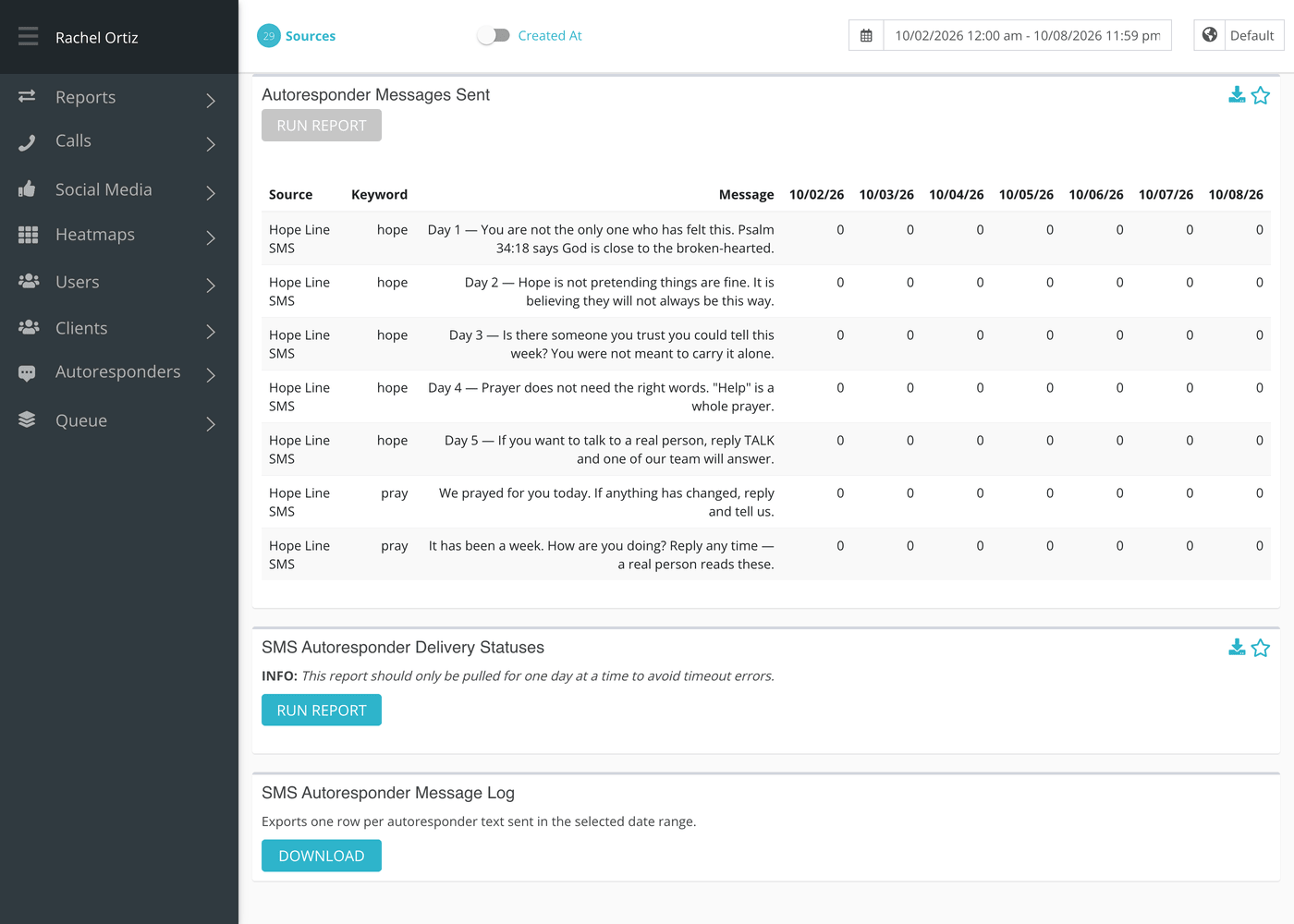
Each card has its own Run Report button, and the Message Log card has a Download button instead.
Card 1: Autoresponder Messages Sent
This table has a row for each message in each campaign. A campaign that sends a welcome text and four follow-ups has five rows.
| Column | What it means |
|---|---|
| Source | The source the campaign runs on. |
| Keyword | The campaign’s keyword. |
| Message | The words of that message. |
| Day columns | How many times that message was sent on that day. |
There is no total column. Read across a row to see when a message went out, or down a day to see what the campaign sent.
A campaign is included when it started on or before the end of your date range, has not ended before the end of the range, and was not archived before the end of the range. That is why a campaign you archived last week still shows in a report for the month before.
Card 2: SMS Autoresponder Delivery Statuses
Pull this card for one day at a time. A longer range can time out before it finishes.
Each box shows a count and a percentage. The percentage is that status’s share of every autoresponder text created in the range. The boxes you see depend on what your carrier reported back, and a plain total is always there.
| Status | What it means |
|---|---|
| Total | Every autoresponder message created in the range. |
| Sent | The message was handed to the carrier. |
| Failed | The message failed to send or to be delivered. |
| Delivered | The carrier reported it delivered to the person’s phone. |
| Unknown Delivery Status | The message was sent but no delivery result came back. |
| Unknown Send Status | Echo has no record of whether the message was sent. |
Card 3: SMS Autoresponder Message Log
The log is a file, not a table on screen. It holds one row for every autoresponder text sent in the range.
- Set the date range and sources.
- Click Download on the Message Log card.
| Column in the file | What it holds |
|---|---|
| Source | The source the text was sent from. |
| Campaign Name | The name of the campaign. |
| Keyword | The campaign’s keyword. |
| From Phone Number | Your number that sent the text. |
| To Phone Number | The subscriber’s number. |
| Message Body | The words that were sent. |
| Direction | Always Outbound. |
| Delivery Status | The result the carrier reported. When no result has come back, the latest status or error Echo recorded is shown. |
| Sent At | When the text was sent, in the time zone you picked. |
| Segments | How many SMS segments the text used. Long texts are split into several segments. |
| Error Code | The carrier’s error code, when a text failed. |
What the measurements mean
| Term | What it means |
|---|---|
| Autoresponder message | One scheduled text in a campaign: the welcome, a follow-up, or a reminder. |
| Source | The text number or account a campaign sends from. |
| Segment | One part of a text. A long text is split into several segments when it is sent. |
| Delivery status | What the carrier told Echo happened to the text. It can lag the send by a short time. |
If something looks wrong
- The delivery statuses card never finishes. Shorten the range to a single day.
- Counts here and in Daily Subs do not match. They count different things: texts sent, not people joined. One person can receive several texts.