When somebody texts one of your keywords, they join that campaign. Subscriptions is the list of everybody who has — how far through the series they are, and whether they are still on it.
An audience is a list you built. A subscription is a list somebody joined. This screen is the second kind.
Where to find it
In the admin menu, click Auto-Responders, then Subscriptions along the top.
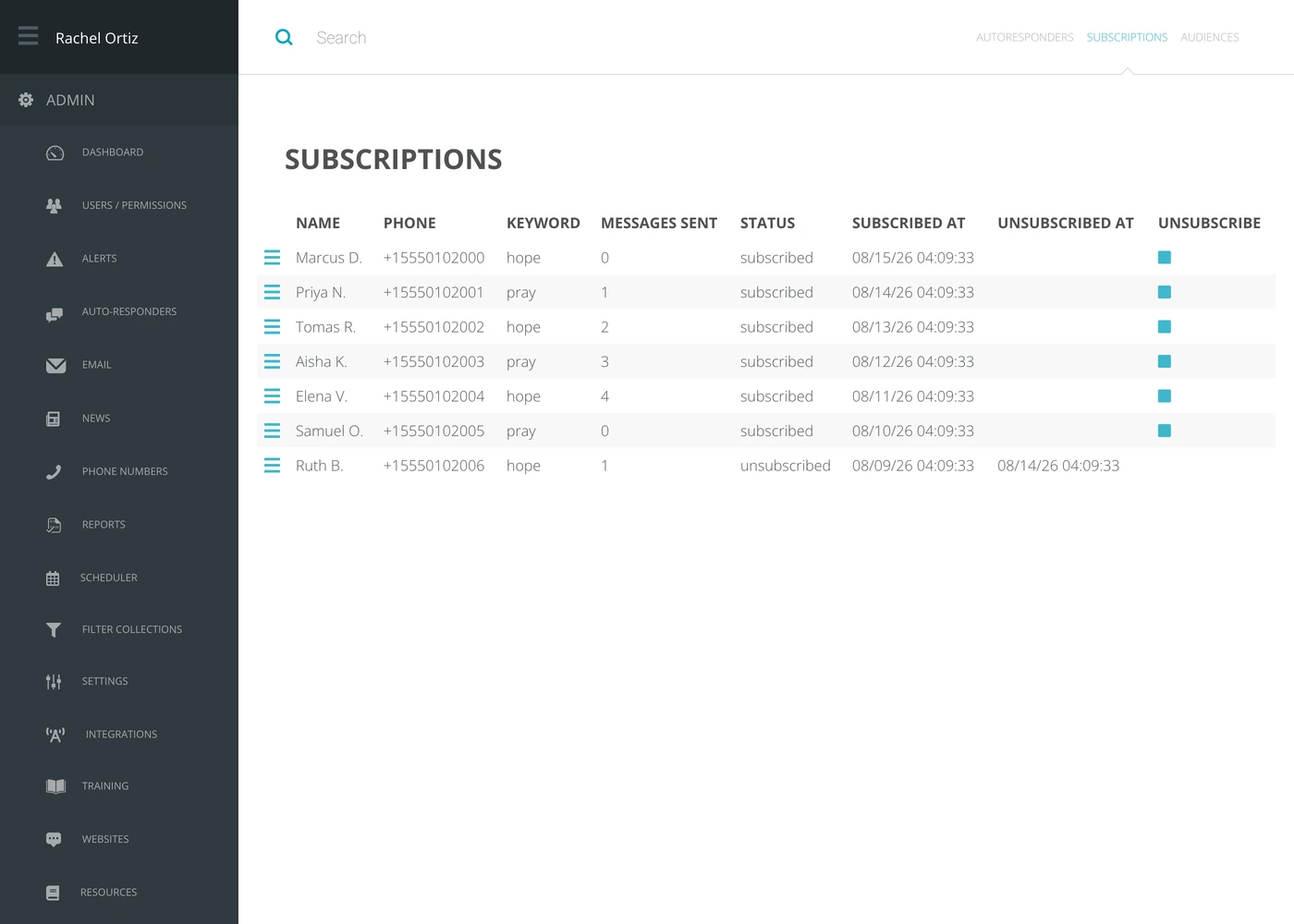
What each column tells you
| Column | What it means |
|---|---|
| Name | The seeker, as Echo knows them. |
| Phone | The number they subscribed from. |
| Keyword | The word they texted, which is also which campaign they are on. |
| Messages Sent | How many of the campaign's messages they have received — how far through the series they are. |
| Status | subscribed or unsubscribed. |
| Subscribed At | When they joined. |
| Unsubscribed At | When they left, if they have. |
The search box at the top filters the list, which is the fastest way to answer “is this person getting our texts?”
Taking somebody off
Click the stop icon in the Unsubscribe column on their row. Their status changes and the date is recorded.
Unsubscribing here is not campaign-specific. It marks the person as unsubscribed from your ministry, so it takes them off every campaign they are on with you and stops your ministry messaging them — not just this one series. That is usually what somebody asking to be taken off means, but be sure before you click.
Seekers can also take themselves off by replying STOP, which is why a row can turn up unsubscribed with nobody in your team having touched it. That is the system working.
Putting somebody back on
A seeker who opted out can opt back in by texting START. If they ask you in writing instead, an admin can do it for them: open the seeker’s record from the Clients report, and the red Unsubscribed panel at the top of it has a Resubscribe button.
Echo asks you to confirm, and says why: resubscribing somebody without a written request can bring carrier fines and the suspension of your phone number. Keep the request. Nothing resumes on its own afterwards. Messages can flow between you and the person again, but every campaign they were on stays unsubscribed.
An opt-out belongs to your ministry. Somebody who texted STOP to another ministry on Echo is not unsubscribed from you, and the other way round.
What the terms mean
| Term | What it means |
|---|---|
| Subscription | One person on one campaign. |
| Keyword | The word a seeker texts to join. It identifies the campaign. |
| Messages sent | How many of that campaign's messages this person has been sent. |
| Unsubscribed | They will not be sent any more. The row stays, so the history is not lost. |
| Audience | The other kind of list — one you imported rather than one they joined. |