This article covers who inside your ministry can see Echo Analyst reports and evaluations, how to grant access, and what to say in a security questionnaire. For what is sent to the AI provider and what Echo keeps, see What Echo Analyst sends, stores, and who can see it.
Who can see what
Access is layered. Being an admin is the first layer; a permission set is the second.
| What | Who can see it |
|---|---|
| Admin → Echo Analyst (subscribe, deactivate, look up one conversation's evaluation) | Admins who are billing contacts. |
| The Echo Analyst reports, all of them | Admins. Not responders, not users who only hold the reports permission, and not API tokens. |
| The AI Analysis panel on a closed conversation in Talk | Admins who are also in a permission set with View Ai Analysis ticked. An admin without that permission does not see the panel. |
| View AI Analysis PDF, in a conversation's menu | Anyone in a permission set with View Ai Analysis ticked. |
| Critical content alerts | Whoever is subscribed to the echo_analyst_critical alert under Admin → Alerts. |
Giving staff the View Ai Analysis permission
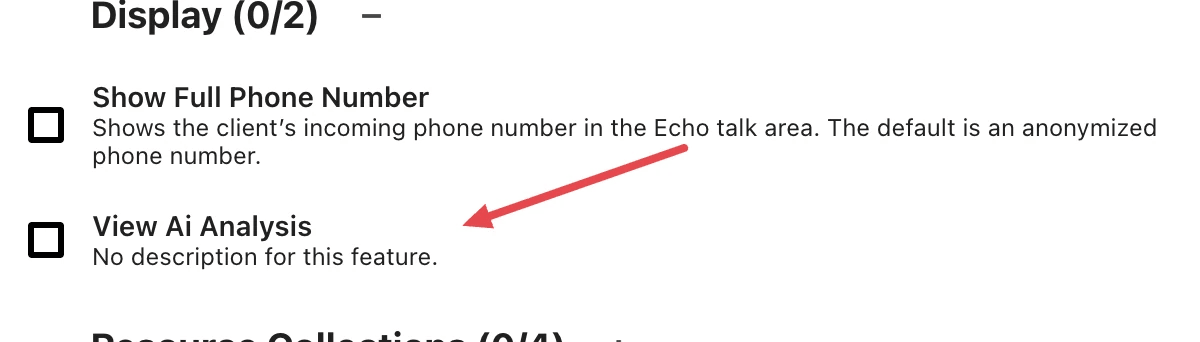
The permission is a feature on a permission set, like Show Full Phone Number. It is only offered once the subscription is active; before that the row is not in the list at all.
- Open Admin, then Users / Permissions.
- Open the permission set you want to change.
- Under Permissions, choose the edit control to open the Edit Permissions dialog.
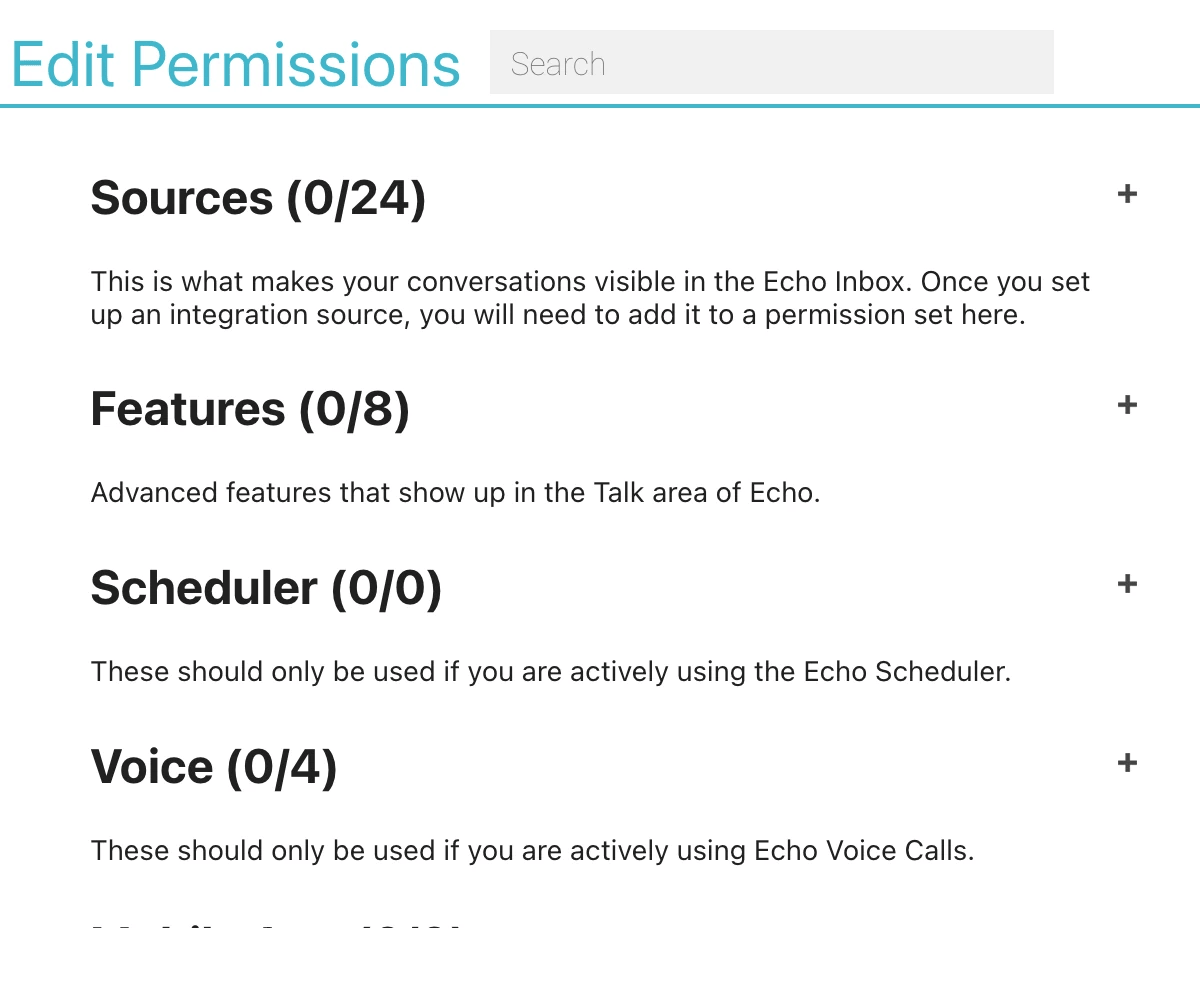
- Expand Features, then Display.
- Tick View Ai Analysis.
- Close the dialog and Save the set. Everyone in the set has the permission from then on.
Because the panel in Talk also requires admin, the practical way to let a coach read individual evaluations is to make them an admin and put them in a set with the permission. A responder who is not an admin sees no analysis panel on their own conversations even if their set has the permission, though they can open the PDF from the conversation menu.
Keep the permission on a small set. The evaluation can carry the personal details the seeker shared, so this permission is closer to "read the conversation" than to "see a score".
What the terms mean
| Term | What it means here |
|---|---|
| Evaluation, or analysis | The set of named fields the model returns for one conversation, stored against that conversation. The reports are built from these, not from the conversations. |
| Qualifying conversation | A closed conversation where both sides sent at least the minimum number of messages for its channel. Only these are ever sent. |
| Transcript | The topic line, the ad line when the conversation started from a Meta ad, and every message in order, each message prefixed with RESPONDER or SEEKER, with recorded names replaced by labels and email addresses and phone numbers by placeholders. This is the whole of what the main evaluation sees about the conversation. |
| Role label | RESPONDER for anyone on your team, SEEKER for anyone else, at the start of each line of the transcript in place of the sender's name. |
| Name label | "Seeker #" or "User #" followed by the person's Echo record number, sent in place of a name Echo has on record for the seeker or a responder. Echo swaps the name back in when the answer returns. |
| Placeholder | "[email 1]", "[phone 1]" and so on, sent in place of an email address or phone number and swapped back when the answer returns. Your ministry's own numbers and email domains are not replaced. |
| Pseudonymization | Replacing names and contact details with labels and placeholders while Echo keeps the key that links each one back to a person. It is not anonymization: the details can be restored, and Echo restores them when the answer returns. |
| System prompt, or rubric | Echo's written scoring instructions, sent with every request. It is versioned, and the version in use can change without the product changing. |
| Structured output | The model is required to answer in a fixed set of named fields. Anything outside that shape is rejected rather than stored. |
| On-platform allowlist | Your ministry's own domains, channel names, resource titles and phone numbers, sent so the model knows which destinations belong to you. |
| Spotlight | A conversation picked out, on a schedule, as worth telling as a story. The check that picks it sends the evaluation and the seeker's messages. |
| Narrative report | Responder Reviews, Ministry Health and Seeker Journeys. Written from stored evaluations, never from transcripts: Seeker Journeys by a second AI call, the other two with no AI call. |
| Permission set | The group a user belongs to in Admin → Users / Permissions, which decides the sources they see and the features they have. |
| View Ai Analysis | The feature on a permission set that governs the analysis panel and the analysis PDF. Offered only while the subscription is active. |
| Billing contact | An email address listed as a billing contact for your ministry. An admin with that email can reach invoices and the Echo Analyst subscription page. |
| Admin | A user marked as an admin for your ministry. Admins reach the reports and the Admin area; they still need a permission set for the analysis panel. |
| Anonymize | The data-deletion process EchoGlobal runs on request. It replaces a seeker's name and contact details, and their identifying details inside the conversation and its messages, with "[redacted]". Since mid-September 2026 it also reaches what Echo Analyst stored from those conversations. It finds those details by matching them exactly as they are on record. |
If you are answering a security questionnaire
The plain answers, in the order reviewers usually ask them:
- Conversation content is sent to a third-party AI provider over its API, once per qualifying conversation after it closes.
- Speaker identities are reduced to RESPONDER and SEEKER before sending. Message text is pseudonymized, not anonymized: the names Echo has on record for the seeker and the responders are replaced with labels, and email addresses and phone numbers other than the ministry's own with numbered placeholders. Other personal details, including names Echo has no record of, are sent as written.
- No contact record fields, no conversation or ministry record numbers and no responder names are attached to the per-conversation request. Seeker and responder record numbers appear only inside the labels that replace names. The ministry's own domains, channel names, resource titles and phone numbers are attached.
- Seeker Journeys sends stored evaluations, with the same replacements, plus the seeker's label. It does not send transcripts. Responder Reviews, Ministry Health and the other Echo Analyst reports send nothing to an AI model.
- The provider does not train on this data: EchoGlobal does not opt in to having it used for training.
- What is stored is a structured evaluation, with the real names and contact details put back, which can include verbatim excerpts and the specific personal details the model noticed. It is stored with the conversation and is subject to the same access rules and the same ministry boundary.
- Access is by admin status for the reports, and by a named permission set feature for the per-conversation panel and PDF.
- Anonymizing a seeker on request also replaces their recorded details in the evaluations and other stored results, for requests carried out since mid-September 2026. It does not rewrite Responder Reviews or Ministry Health reports already written.
Three questions this article does not answer are the ones to put to EchoGlobal support directly: which AI provider is in use today, how long it keeps API requests, and the data processing terms between EchoGlobal and that provider. EchoGlobal uses the model that gives the best results for its cost and may change the model or the provider as better ones come out.