Echo Analyst reads conversations after they close, asks an AI model to evaluate them, and stores what comes back. Before a ministry turns it on, its leaders and its privacy or security reviewer usually want three questions answered plainly: what leaves Echo, what Echo keeps, and who inside the ministry can see it. This article answers those three from how the product is built today. For what the reports are and how to run them, see Getting started with Echo Analyst.
The short version
- What is sent. Each qualifying conversation is sent once, after it closes, to OpenAI through its API. The request carries the conversation's topic line and the text of every message, with each message labeled RESPONDER or SEEKER instead of a name. Inside the text, the names Echo has on record for the seeker and the responders are replaced with labels such as "Seeker #1042", and email addresses and phone numbers, other than your ministry's own, with placeholders such as "[phone 1]".
- What is not sent. Names, email addresses, phone numbers, IP addresses and Echo record numbers are not attached to the request as separate fields. A seeker's or responder's record number travels only inside the label that stands in for their name. The replacements cover what Echo can recognize, not every personal detail: a name Echo has no record of (a relative the seeker mentions, for example), a street address or an age is sent as written.
- What comes back. A structured evaluation, not a copy of the conversation. Echo swaps the real names, email addresses and phone numbers back in for the labels and placeholders, then stores it against the conversation, inside your ministry's own data. It can hold short verbatim excerpts and a log of the personal details the model noticed, including the detail itself.
- Turning it on. One button, pressed by an admin who is also a billing contact. Nothing else needs configuring.
- Who sees it. The reports are for admins only. The per-conversation analysis panel in Talk needs a permission called View Ai Analysis, which is added to permission sets and only appears once the subscription is active.
When a conversation is analyzed
Analysis runs about a minute after a conversation is closed, and only if both sides sent enough messages to be worth reading: one each way for email, three each way for website chat, two each way for every other channel. A conversation that is still open, or that was abandoned before your team replied, is never sent.
An admin can also analyze a single conversation by hand from Admin → Echo Analyst, by pasting its ID or URL. Before you subscribe this is limited to ten conversations a month, and it is the way to see what comes back on your own material.
Two smaller AI calls follow the main one for the same conversation, each answering one question from the same transcript: which Scripture was shared, and whether a responder pointed the seeker somewhere off-platform. A third, run on a schedule rather than at close, looks at finished evaluations to pick out the ones worth telling as stories. What each of those sends is listed below.
What is sent to the AI provider
The main evaluation is a single request to OpenAI. This is what is in it and what is not.
| Item | Sent? | Detail |
|---|---|---|
| The conversation's topic line | Yes | As it appears in Echo, with the same replacements as the messages. |
| Every message, in order | Yes, in full | The text of each message as it was written, with two replacements: the recorded names of the seeker and the responders become labels, and email addresses and phone numbers become placeholders. Nothing is shortened or removed. How the replacements work is described below. |
| Who wrote each message | As a role only | Each line is prefixed RESPONDER or SEEKER. The prefix carries no name and no record number. |
| The seeker's name, email, phone number or IP address | Not as fields | These are not attached to the request. Where someone typed them into a message, the seeker's recorded name reaches the model as a label, and an email address or phone number as a placeholder, as described below. |
| The responder's name | No | Not as a field. Where a responder's recorded name appears in a message, it is replaced with a label such as "User #87". The narrative reports below use the same labels. |
| Conversation, seeker or ministry record numbers | Only inside labels | No conversation or ministry record number is sent. The seeker's and responders' record numbers appear only as part of the labels that replace their names. Echo keeps the link between the evaluation and the conversation on its own side. |
| Your ministry's own destinations | Yes | Your website domains, email domains, the names and platforms of your connected channels, the titles and domains of your approved resources, and your provisioned phone numbers and text short codes. This is the on-platform allowlist, sent so the model does not treat "text JESUS to 53787" as a responder sending a seeker away from your ministry. For the same reason, your own phone numbers, and addresses at your own email domains, are left as they are inside the messages. |
| The scoring instructions | Yes | Echo's rubric, as a system prompt. It contains no seeker or ministry data. |
The model is asked for its answer in a fixed format, so what comes back is a set of named fields rather than free prose about the conversation. The request is made from Echo's own OpenAI account, over HTTPS. When the answer returns, Echo swaps the real names, email addresses and phone numbers back in before it stores anything.
Echo replaces the names and contact details it can recognize, not every personal detail, and it keeps the key that turns each label back into a person. That makes this pseudonymization, not anonymization. If a seeker mentions someone Echo has no record of, a street address, a workplace or a child's age, those words are sent to the model as part of the transcript.
OpenAI does not train its models on data sent through its API unless the customer opts in, and EchoGlobal has not opted in: data sharing is turned off on EchoGlobal's account. For how long OpenAI keeps API requests, and for the data processing terms between EchoGlobal and OpenAI, ask EchoGlobal support.
How names and contact details are replaced
Every AI call described in this article makes the same replacements before anything leaves Echo, and reverses them when the answer returns.
- Names. Echo replaces the names it has on record for the people in what is being sent. For a conversation, that is the seeker, every responder who wrote in it, and the responder who claimed it. The seeker becomes "Seeker #" followed by their Echo record number, and a responder "User #" followed by theirs. A full name is matched however it is capitalized, and each part of it three letters or longer is matched as it is capitalized on record: for a seeker recorded as Sarah Jones, "Sarah Jones", "sarah jones" and "Sarah" are replaced, but "sarah" is not. A name followed by a number is left alone, so Scripture references such as "John 3:16" reach the model intact.
- Email addresses and phone numbers. Each becomes a numbered placeholder, "[email 1]", "[phone 1]" and so on, and the same address or number gets the same placeholder each time it appears. Any run of 7 to 15 digits counts as a phone number, with or without spaces, dots, dashes, brackets or a leading +, so a long reference number is replaced too. Shorter or longer numbers, such as a card number, are sent as written. Your ministry's own phone numbers, and addresses at your own email domains, are left as they are so the model can recognize them.
- What is not replaced. A name Echo has no record of, such as a relative or friend the seeker mentions. A detail written in a form Echo does not recognize, such as a phone number spelled out in words or an email address written without its @. Street addresses, workplaces, ages and other personal details.
The two follow-on calls
Scripture detection and boundary detection each send the same transcript again, in the same RESPONDER and SEEKER form and with the same replacements, to answer one narrow question. Boundary detection also sends your on-platform allowlist, so it can tell your own numbers and addresses from anyone else's. Email and other rich-text messages have their formatting stripped first, so only the words go. The model is asked to quote the exact lines it found. Echo swaps the real names and contact details back into those quotes, and the quotes are what Echo stores from these calls.
The spotlight check
On a schedule, Echo looks at finished evaluations to find conversations worth sharing as stories. For each candidate it sends the stored evaluation together with up to 30 of the seeker's messages, each cut to 500 characters, with the same replacements. The responder's messages are not sent to this call. The reason and the quote that come back have the real details put back before they are stored.
The narrative reports send something different
Responder Reviews, Ministry Health and Seeker Journeys are written by a second kind of AI call. These do not send transcripts. They send a sample of the evaluations Echo already holds, in the form of scores, summaries and coaching notes, and they add a small amount of context so the report can be written in plain language. All of it goes through the same replacements: the seeker of each conversation the report draws on, and the responder recorded on each evaluation, go out as labels, and email addresses and phone numbers as placeholders.
| Report | Sent alongside the sampled evaluations |
|---|---|
| Responder Reviews | The reviewed responder as a label such as "User #87" in place of their name, and your on-platform allowlist. |
| Ministry Health | Your ministry's name as it appears in Echo. The responders listed in the report's figures go out as labels, not by name. |
| Seeker Journeys | The seeker as "Seeker #" and their record number, in place of their name, plus the responder on each conversation as a label and the short seeker-experience summary already stored in each evaluation. |
Echo swaps the real names back into the finished report, so it reads naturally inside Echo. Each of these reports records which model wrote it and what it cost, so a report written by a stand-in during testing says so on its face.
Every other Echo Analyst report is assembled from the evaluations already stored. Running one sends nothing to an AI model, and each of those reports says so on the page.
What comes back, and what Echo keeps
The evaluation is a set of named fields, stored against the conversation in your ministry's own data. What it holds depends on the current rubric, and includes:
- Scores from 1 to 5 across the responder categories, and an overall score.
- Whether prayer was offered and prayed, whether a testimony was shared, whether there is a praise report, and whether a referral is needed.
- A short summary of the seeker's experience, the seeker's posture and movement, the Gospel elements presented, Scripture passages, and the resources shared.
- Content alerts, each with a priority tier. A tier 1 alert (crisis, a minor at risk, and similar) also triggers the echo_analyst_critical alert to whoever is subscribed to it under Admin → Alerts.
- The language the seeker wrote in.
- A Personal Info Shared section, described next.
Echo also records the model used, the number of tokens in and out, and the cost of the call, and it copies the responder, the source and the seeker's record number from the conversation so reports can filter by them.
The Personal Info Shared section
The model is asked to notice when identifying details are shared, by either side, and to record each one. For every detail it records the type (a name, a phone number, an age, and so on), who shared it, the value that was shared, whether it was asked for, how serious it is, and which message it was in. The section also carries three flags: has personal info, has contact risk, and has minor risk. Where the model saw a label or a placeholder, Echo puts the real name, email address or phone number back before storing it, so the recorded value is the real one.
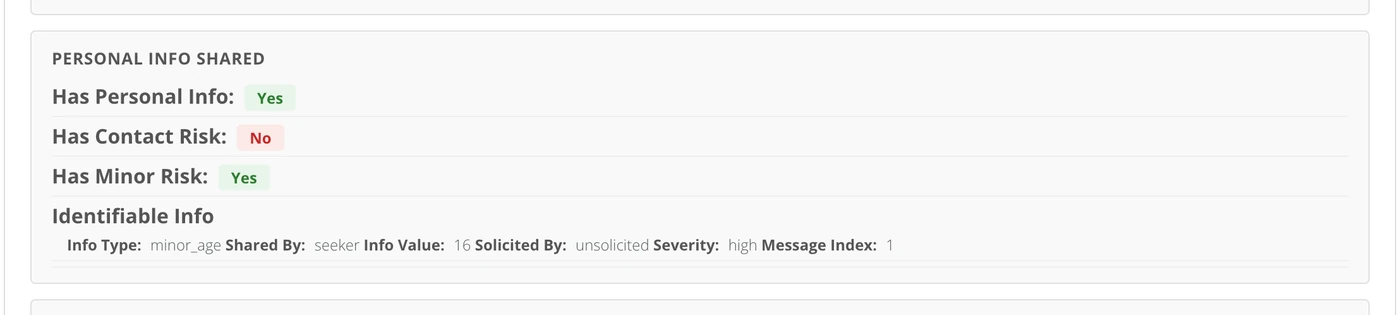
This means the evaluation can contain the personal detail itself, not only the fact that one was shared. It is stored with the same protection as the conversation, and anyone who can open the evaluation can read it. Treat access to evaluations as access to the conversations behind them.
Where it can be read
A stored evaluation appears in three places: the lookup on Admin → Echo Analyst, the AI Analysis panel on a closed conversation in Talk, and the View AI Analysis PDF item in a conversation's menu. The Echo Analyst reports read the evaluations in aggregate. The GraphQL API can return evaluations to a valid API token for your ministry.
How long it is kept
An evaluation is kept with its conversation. It has no expiry of its own and nothing deletes it on a schedule.
Anonymizing a seeker, the data-deletion process EchoGlobal runs on request, reaches what Echo Analyst stored as well as the conversations themselves. It replaces the seeker's recorded name, email address, phone numbers, IP address and location with "[redacted]" wherever they appear in their conversations and in what was stored from them: the evaluations, spotlight reasons and quotes, boundary-detection findings, Scripture excerpts, and the Seeker Journey summary written about them. It matches those details exactly as they are on record, so a detail written another way, such as a first name on its own or a phone number typed differently from the record, is not caught.
Two things it does not do:
- It does not reach back. Anonymizing began covering Echo Analyst's stored results in mid-September 2026, and nothing was re-run for seekers anonymized before then, so what was stored from their conversations can still hold their details. If you asked EchoGlobal to remove a seeker before then, contact support about what is still stored for them.
- It does not rewrite finished reports. A Responder Review or Ministry Health report written before the request can still mention the seeker.
Turning it on
You need to be an admin whose email is one of your ministry's billing contacts. That is the same access that reaches your invoices. Anyone else does not see the Echo Analyst tab in Admin.
- Open Admin, then Echo Analyst.
- Read the estimate. It shows last month, roughly how many of your conversations qualified, and what that would have cost.
- Choose Sign Up for Echo Analyst and confirm.
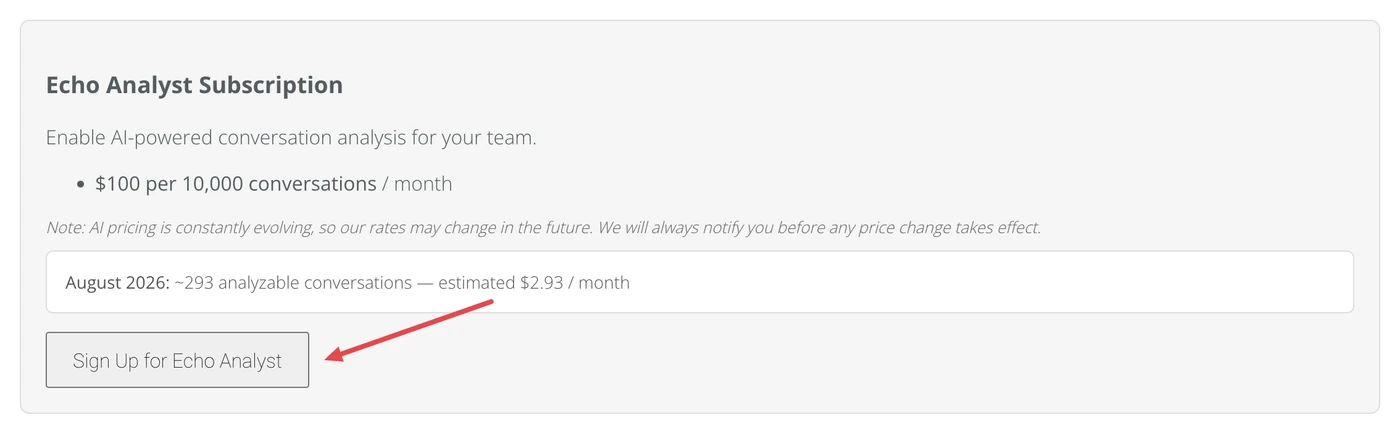
That is the whole setup. From that moment every qualifying conversation in your ministry is analyzed when it closes, across every channel at once. There is no per-channel switch, no per-team switch and no further configuration step. The same page shows the subscription as active, counts the analyses run this month and last, and is where you deactivate.
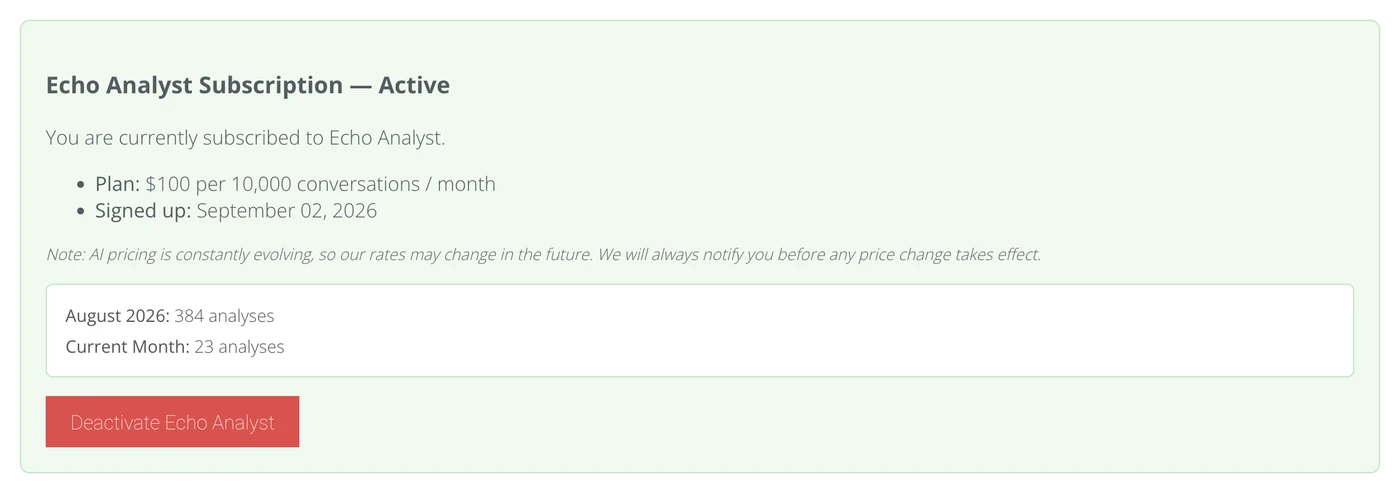
Deactivating stops new analyses. It does not delete the evaluations already stored.
Who can see what
Access is layered. Being an admin is the first layer; a permission set is the second.
| What | Who can see it |
|---|---|
| Admin → Echo Analyst (subscribe, deactivate, look up one conversation's evaluation) | Admins who are billing contacts. |
| The Echo Analyst reports, all of them | Admins. Not responders, not users who only hold the reports permission, and not API tokens. |
| The AI Analysis panel on a closed conversation in Talk | Admins who are also in a permission set with View Ai Analysis ticked. An admin without that permission does not see the panel. |
| View AI Analysis PDF, in a conversation's menu | Anyone in a permission set with View Ai Analysis ticked. |
| Critical content alerts | Whoever is subscribed to the echo_analyst_critical alert under Admin → Alerts. |
Giving staff the View Ai Analysis permission
The permission is a feature on a permission set, like Show Full Phone Number. It is only offered once the subscription is active; before that the row is not in the list at all.
- Open Admin, then Users / Permissions.
- Open the permission set you want to change.
- Under Permissions, choose the edit control to open the Edit Permissions dialog.
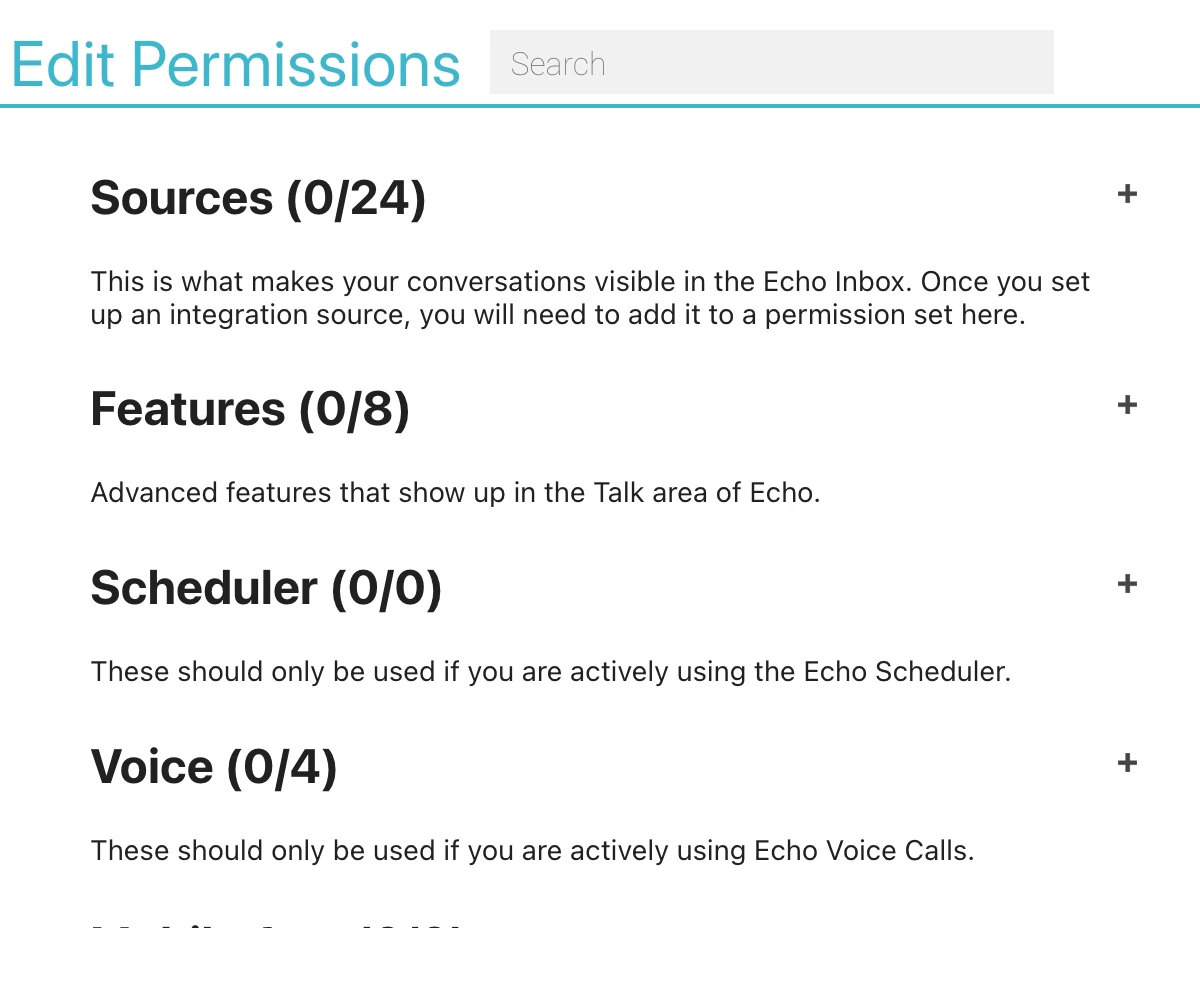
- Expand Features, then Display.
- Tick View Ai Analysis.
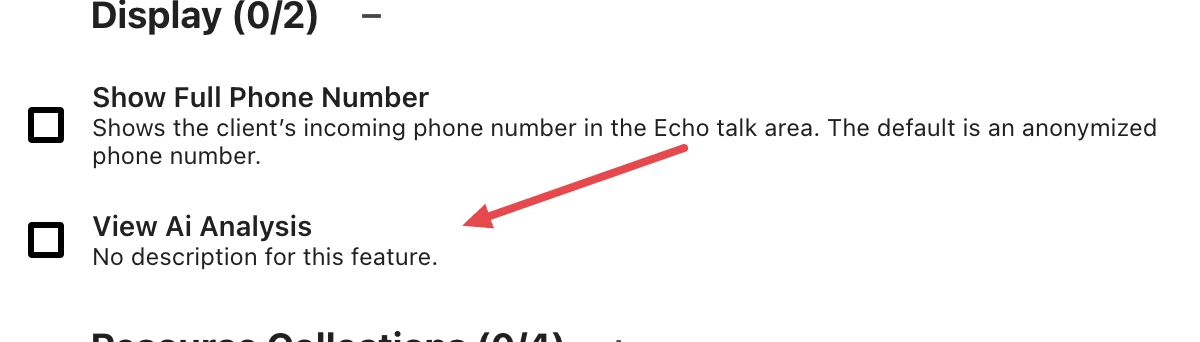
- Close the dialog and Save the set. Everyone in the set has the permission from then on.
Because the panel in Talk also requires admin, the practical way to let a coach read individual evaluations is to make them an admin and put them in a set with the permission. A responder who is not an admin sees no analysis panel on their own conversations even if their set has the permission, though they can open the PDF from the conversation menu.
Keep the permission on a small set. The evaluation can carry the personal details the seeker shared, so this permission is closer to "read the conversation" than to "see a score".
What the terms mean
| Term | What it means here |
|---|---|
| Evaluation, or analysis | The set of named fields the model returns for one conversation, stored against that conversation. The reports are built from these, not from the conversations. |
| Qualifying conversation | A closed conversation where both sides sent at least the minimum number of messages for its channel. Only these are ever sent. |
| Transcript | The topic line followed by every message in order, each prefixed with RESPONDER or SEEKER, with recorded names replaced by labels and email addresses and phone numbers by placeholders. This is the whole of what the main evaluation sees about the conversation. |
| Role label | RESPONDER for anyone on your team, SEEKER for anyone else, at the start of each line of the transcript in place of the sender's name. |
| Name label | "Seeker #" or "User #" followed by the person's Echo record number, sent in place of a name Echo has on record for the seeker or a responder. Echo swaps the name back in when the answer returns. |
| Placeholder | "[email 1]", "[phone 1]" and so on, sent in place of an email address or phone number and swapped back when the answer returns. Your ministry's own numbers and email domains are not replaced. |
| Pseudonymization | Replacing names and contact details with labels and placeholders while Echo keeps the key that links each one back to a person. It is not anonymization: the details can be restored, and Echo restores them when the answer returns. |
| System prompt, or rubric | Echo's written scoring instructions, sent with every request. It is versioned, and the version in use can change without the product changing. |
| Structured output | The model is required to answer in a fixed set of named fields. Anything outside that shape is rejected rather than stored. |
| On-platform allowlist | Your ministry's own domains, channel names, resource titles and phone numbers, sent so the model knows which destinations belong to you. |
| Spotlight | A conversation picked out, on a schedule, as worth telling as a story. The check that picks it sends the evaluation and the seeker's messages. |
| Narrative report | Responder Reviews, Ministry Health and Seeker Journeys. Written by a second AI call from stored evaluations, never from transcripts. |
| Permission set | The group a user belongs to in Admin → Users / Permissions, which decides the sources they see and the features they have. |
| View Ai Analysis | The feature on a permission set that governs the analysis panel and the analysis PDF. Offered only while the subscription is active. |
| Billing contact | An email address listed as a billing contact for your ministry. An admin with that email can reach invoices and the Echo Analyst subscription page. |
| Admin | A user marked as an admin for your ministry. Admins reach the reports and the Admin area; they still need a permission set for the analysis panel. |
| Anonymize | The data-deletion process EchoGlobal runs on request. It replaces a seeker's name and contact details, and their identifying details inside the conversation and its messages, with "[redacted]". Since mid-September 2026 it also reaches what Echo Analyst stored from those conversations. It finds those details by matching them exactly as they are on record. |
If you are answering a security questionnaire
The plain answers, in the order reviewers usually ask them:
- Conversation content is sent to a third-party AI provider, OpenAI, over its API, once per qualifying conversation after it closes.
- Speaker identities are reduced to RESPONDER and SEEKER before sending. Message text is pseudonymized, not anonymized: the names Echo has on record for the seeker and the responders are replaced with labels, and email addresses and phone numbers other than the ministry's own with numbered placeholders. Other personal details, including names Echo has no record of, are sent as written.
- No contact record fields, no conversation or ministry record numbers and no responder names are attached to the per-conversation request. Seeker and responder record numbers appear only inside the labels that replace names. The ministry's own domains, channel names, resource titles and phone numbers are attached.
- The narrative reports send stored evaluations, with the same replacements, plus a responder's label, the ministry's name, or a seeker's label, depending on the report. They do not send transcripts. The other Echo Analyst reports send nothing to an AI model.
- OpenAI does not train on this data: EchoGlobal has not opted in to data sharing.
- What is stored is a structured evaluation, with the real names and contact details put back, which can include verbatim excerpts and the specific personal details the model noticed. It is stored with the conversation and is subject to the same access rules and the same ministry boundary.
- Access is by admin status for the reports, and by a named permission set feature for the per-conversation panel and PDF.
- Anonymizing a seeker on request also replaces their recorded details in the evaluations and other stored results, for requests carried out since mid-September 2026. It does not rewrite Responder Reviews or Ministry Health reports already written.
Two questions this article does not answer, how long OpenAI keeps API requests and the data processing terms between EchoGlobal and OpenAI, are the ones to put to EchoGlobal support directly.