Echo Analyst reads the conversations your team has already had and turns them into reports — fourteen of them, from coaching one responder to looking at the whole ministry at once. It is an add-on: it is not switched on until a ministry admin subscribes to it.
This article covers what it is, what it costs, how to turn it on, and how to run any of the reports. Each report has its own article for reading the numbers it gives back.
What Echo Analyst is
Every conversation that qualifies is analyzed after it closes. Echo Analyst stores what it found — which parts of the Gospel were shared, whether the seeker moved toward God or away, what stood in the way, whether Scripture was handled well, whether anything needed care beyond the conversation.
The reports are built from those stored analyses. That is the important part: running a report does not re-read your conversations, it reads what was already worked out about them.
What it costs
Echo Analyst is priced at $100 per 10,000 conversations a month. The subscription page shows an estimate for your own ministry, based on how many of your conversations actually qualify, so you see the number before you decide.
Before you subscribe, you can analyze up to 10 conversations a month for free — enough to see what comes back on your own material rather than on a demonstration.
Without the add-on, the analysis is not just unbilled — it is hidden. Conversations are not analyzed beyond the ten free ones each month, and the analysis panel does not appear anywhere in Echo.
Which conversations get analyzed
A conversation has to have enough of a back-and-forth to be worth reading. Both sides need to have sent a minimum number of messages, and the minimum depends on where the conversation came from:
| Where it came from | Messages needed, each way |
|---|---|
| 1 | |
| Website chat | 3 |
| Every other channel | 2 |
Analysis runs about a minute after a conversation is closed, not while it is still open. A conversation that is still going, or that was abandoned before your team replied, has no analysis and appears in no Echo Analyst number.
Turning it on
You need to be an admin with billing access.
- Open Admin, then Echo Analyst.
- Read the estimate for your ministry — it shows the month, roughly how many of your conversations qualify, and what that would cost.
- Choose Sign Up for Echo Analyst.
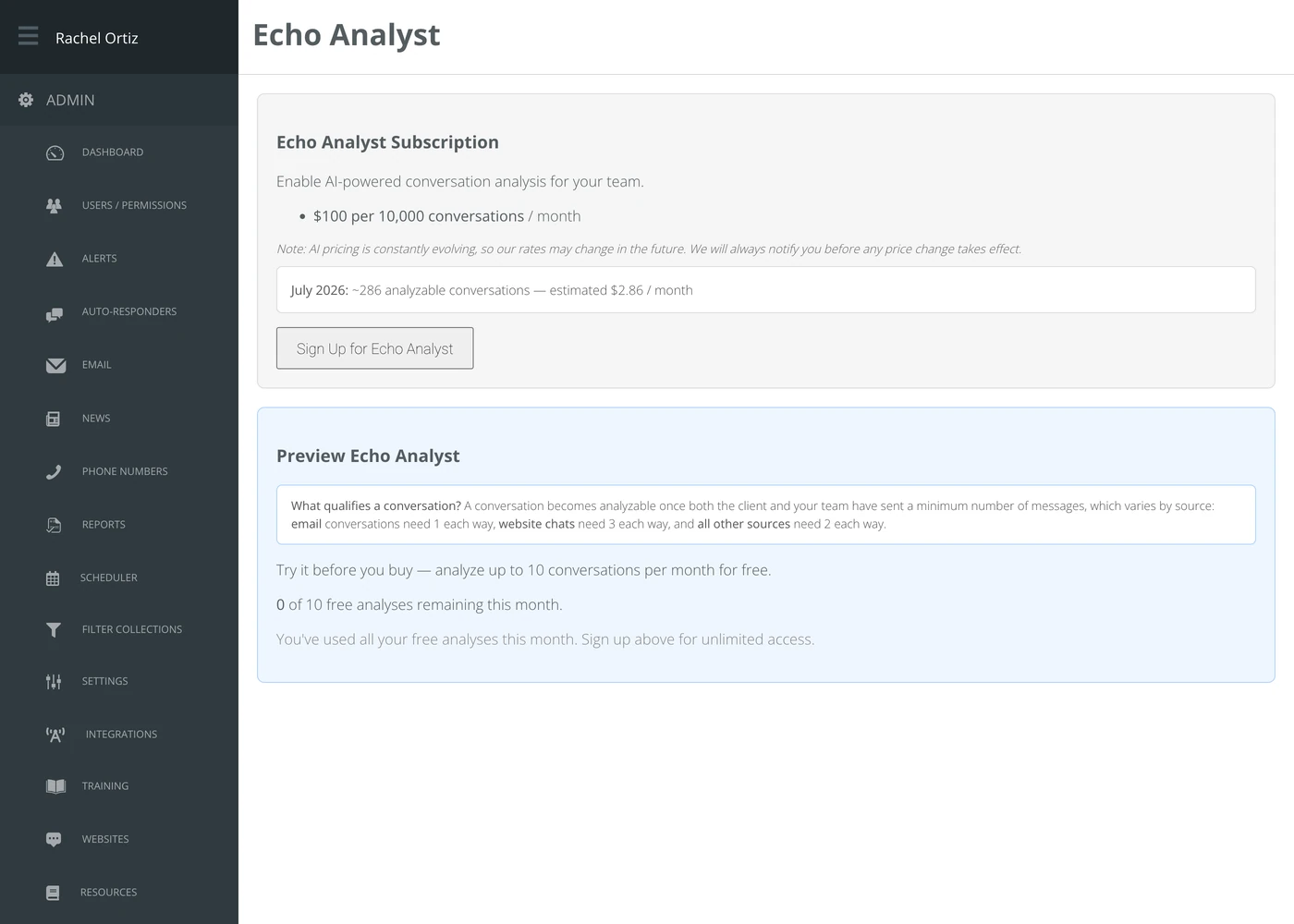
The same page is where you cancel. Pricing can change, and the page says so — you are told before any change takes effect.
Finding the reports
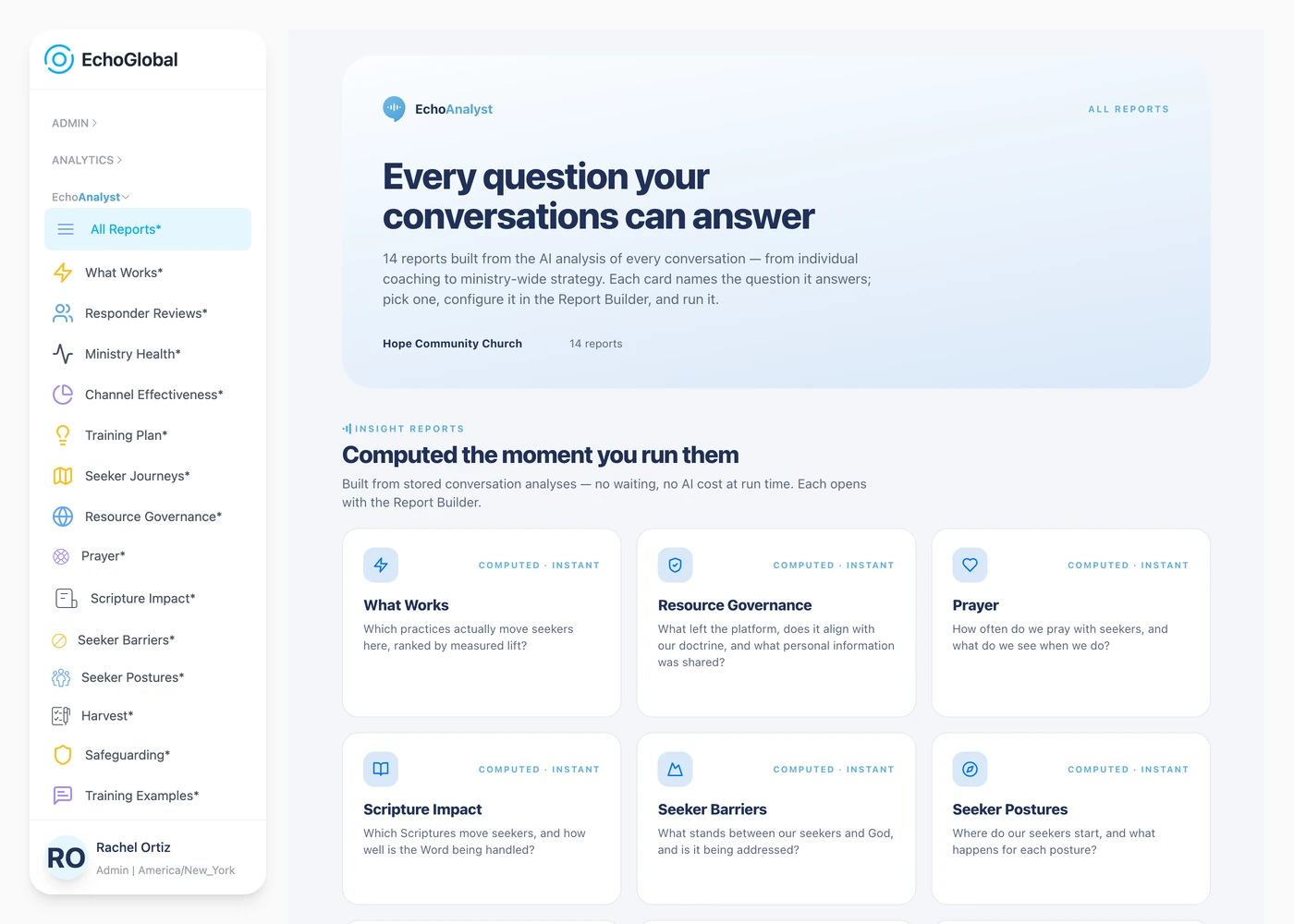
The reports sit under EchoAnalyst in the left-hand menu. All Reports is the catalog: one card per report, each naming the question it answers, so you can pick by the question rather than by the name.
Running a report
Every report opens on the same panel — the Report Builder. Nothing runs until you ask it to.
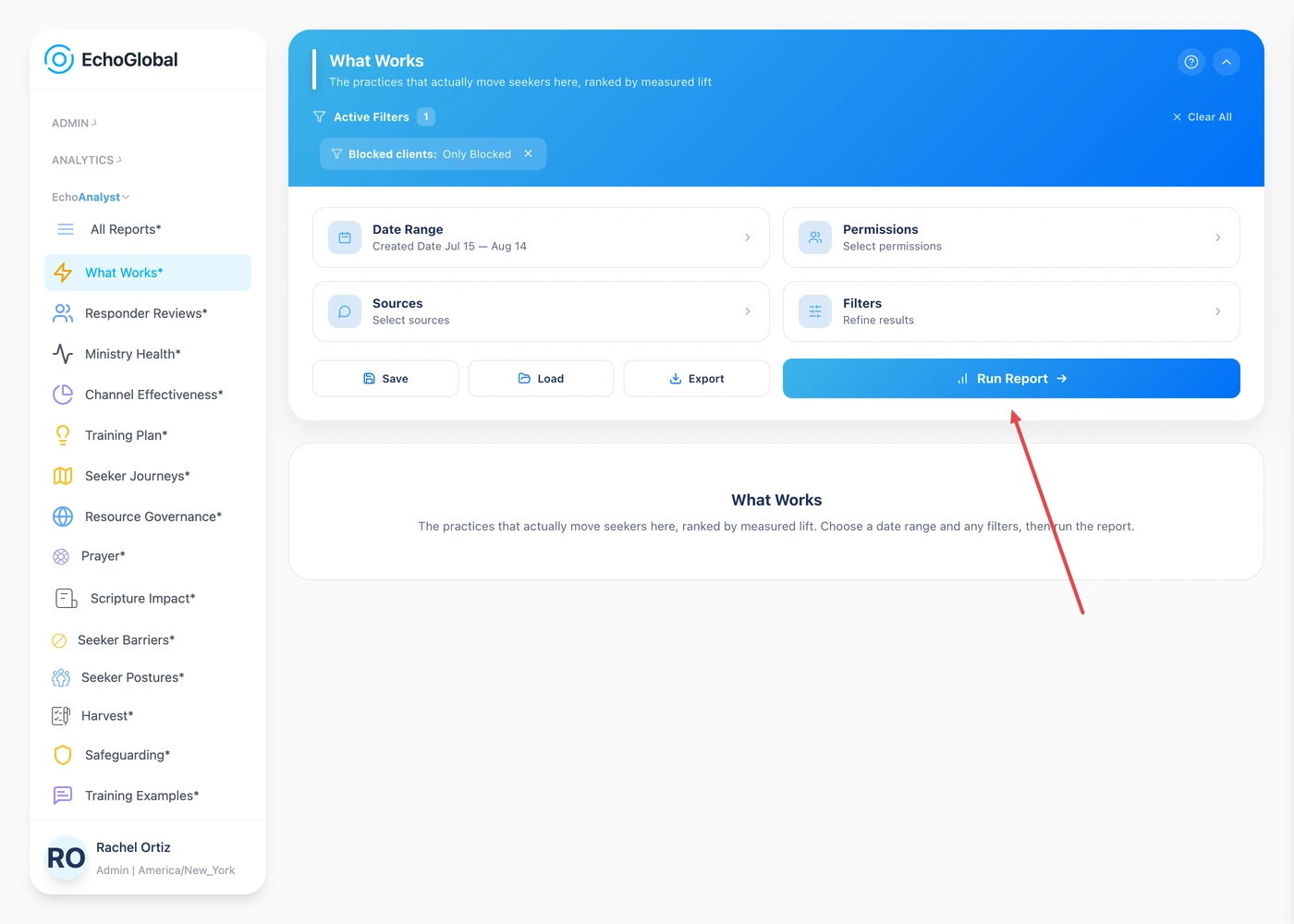
| Field | What it means |
|---|---|
| Date Range | The period the report covers. |
| Sources | Which of your channels and campaigns to include. Leave it alone to include everything. |
| Permissions | Narrows the report to a particular set of responders. |
| Filters | Anything more specific you want to exclude or require. |
- Set the fields above as needed, then choose Run Report.
The panel folds itself away while the report builds, and the report appears underneath it. Every report opens with a Definitions section explaining each term it uses — worth reading the first time you run one, since the words are precise and not always the words you would guess.
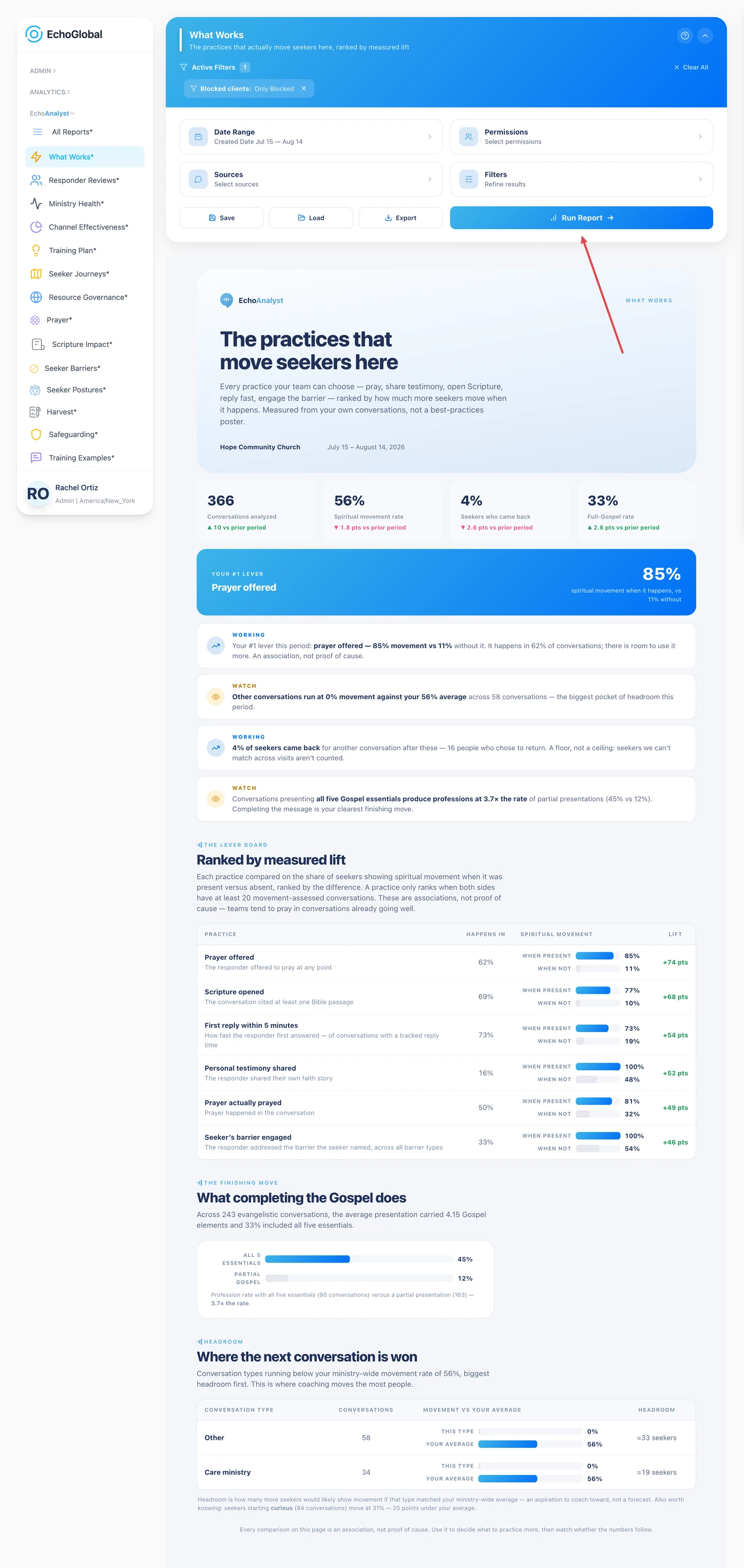
A report that comes back empty over a period you know was busy is almost always the Sources filter. It remembers what you last chose, so a selection you made months ago can quietly exclude everything. Open Sources, check what is selected, and run it again.
Saving, loading and exporting
Three buttons sit under the Report Builder:
| Button | What it does |
|---|---|
| Save | Gives the current dates and filters a name, so you can run the same report the same way next month. |
| Load | Brings back a report you saved. |
| Export | Takes the results out as xlsx or CSV, either downloaded straight away or emailed to you when it's ready. Use the email option for a long period — a large report takes a while to build. |
Insight reports and narrative reviews
The fourteen reports come in two kinds, and they behave differently.
Insight reports — eleven of them — are computed the moment you run them. There is no waiting and no AI cost at the time you run it, because the reading was done when each conversation closed.
Narrative reviews — three of them — are written for you. Echo Analyst reads the period and produces prose: what is going well, what to work on, what changed. These take longer, build in the background, and keep their history, so you can put this month's review next to last month's.
The fourteen reports
Insight reports, computed the moment you run them:
| Report | The question it answers |
|---|---|
| What Works | Which practices actually move seekers here, ranked by measured lift? |
| Resource Governance | What left the platform, does it align with our doctrine, and what personal information was shared? |
| Prayer | How often do we pray with seekers, and what do we see when we do? |
| Scripture Impact | Which Scriptures move seekers, and how well is the Word being handled? |
| Seeker Barriers | What stands between our seekers and God, and is it being addressed? |
| Seeker Postures | Where do our seekers start, and what happens for each posture? |
| Harvest | What happened to the people who said yes? |
| Crisis & Safeguarding | How much crisis weight did we carry, and was it handled well? |
| Training Examples | Which conversations should we teach from? |
| Channel Effectiveness | Which channels and sources bring conversations that actually go somewhere? |
| Training Plan | What should we train on, and who needs it most? |
Narrative reviews, written for you:
| Review | The question it answers |
|---|---|
| Responder Reviews | How is this responder doing, and what should they work on next? |
| Ministry Health | How healthy is the whole ministry right now — and versus last period? |
| Seeker Journeys | What has one seeker's whole path with us looked like? |
All Reports also carries two reference guides rather than reports: Barrier definitions, which is what each seeker barrier means and the moments it sounds like, and the Posture guide, which is the ladder from hostile to already believing.
What the terms mean
| Term | What it means |
|---|---|
| Add-on | A paid feature a ministry admin turns on separately. It is off by default and does not appear anywhere in Echo until subscribed. |
| Analyzed conversation | A conversation that closed with enough back-and-forth to qualify (see "Which conversations get analyzed" above) and has a stored analysis. Only these count in any Echo Analyst number. |
| Insight report | One of the eleven reports computed instantly from already-stored analyses, with no extra AI cost when you run it. |
| Narrative review | One of the three reports Echo Analyst writes in prose after you run it. Builds in the background and keeps its history month to month. |
| Report Builder | The panel every report opens with — Date Range, Sources, Permissions and Filters, plus Run Report. |
| Sources (filter) | Which channels and campaigns a report includes. Remembers your last choice, which is the most common reason a report comes back empty. |
| Permissions (filter) | Narrows a report to a particular set of responders. |
| Admin with billing access | The account role required to turn Echo Analyst on or off — the same access that reaches your ministry's invoices. |
Why these numbers differ from the Conversations report
They count different things, and the difference is not a fault.
The Conversations report counts every conversation. Echo Analyst counts only conversations that were analyzed — which means conversations that had enough back-and-forth to qualify, and that were closed. A period with a lot of one-message inquiries or abandoned chats will show a much larger number in the Conversations report than in any Echo Analyst report.
If you want to know how much of your traffic is being read, the subscription page under Admin → Echo Analyst counts the analyses run last month and this month.
Who can see it
Echo Analyst reports are for admins. A responder does not see them and cannot open one. Turning the subscription on or off additionally requires an admin with billing access, which is the same access that reaches your invoices.