The 153 VITAL report puts your ministry's conversations into the five VITAL numbers the 153 Collective asks its members to report: Views, Interactions, new Touchpoints, new Active faith journeys and new Loyal people. It also shows the evidence behind them, so you can see what each number rests on before you submit it.
This article explains what Echo counts for each number and what it leaves out. It describes Echo's side only. For what 153 asks you to submit, and when, follow 153's own guidance.
Who can open it
The report is part of Echo Analyst, so it is for admins of a ministry with the Echo Analyst add-on. A responder does not see it. Turning the add-on on is covered in Getting started with Echo Analyst.
Running the report
- Open EchoAnalyst in the left-hand menu, then 153 VITAL, under Ministry.
- Set Date Range to January 1 to December 31 of the year you are reporting.
- Leave Sources alone to include every channel, or narrow it if you only want part of your ministry.
- Choose Run Report.
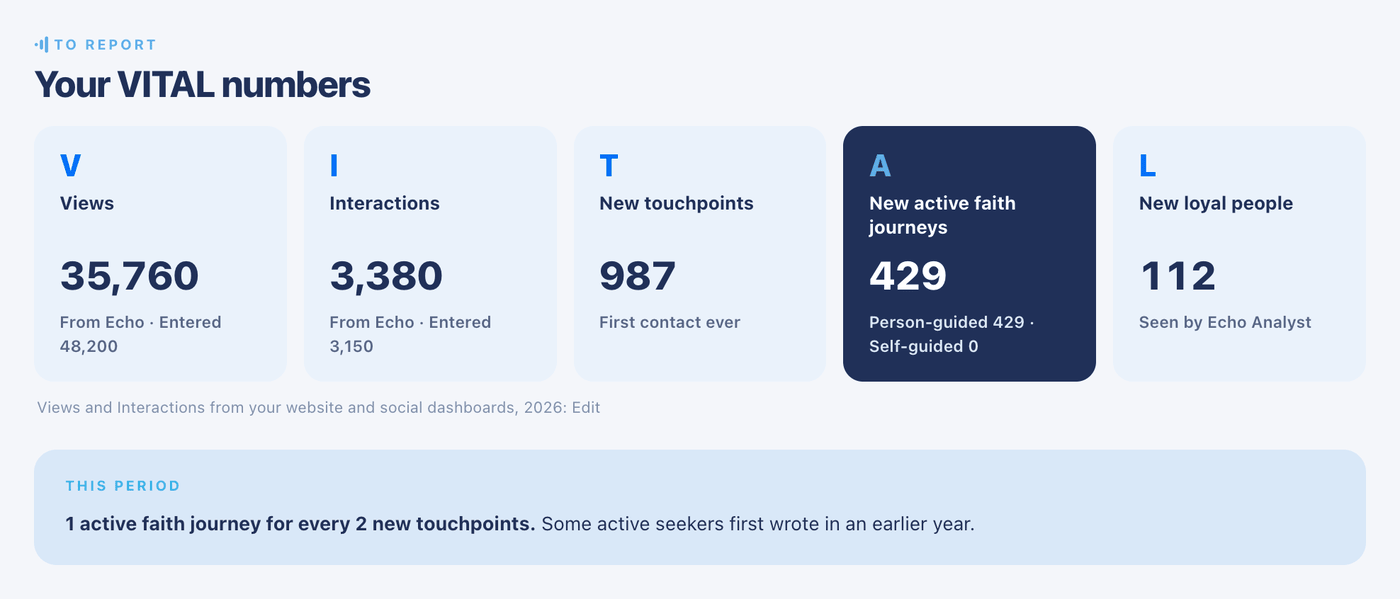
Any date range will run. The numbers to submit are the ones for a full calendar year, and when your range is anything else the report says so above the numbers.
The five numbers
| Number | What Echo counts | If it shows a dash |
|---|---|---|
| Views | Pages that showed your chat widget, counted like a page view. These are events, not people. | No widget activity was recorded in the period. |
| Interactions | Times the chat widget was opened, plus welcome forms that were sent with nothing typed afterward. | No widget activity was recorded in the period. |
| New touchpoints | People whose first contact with your ministry ever came in the period: a conversation they wrote in, or an incoming phone call that someone answered. | It never does. |
| New active faith journeys | Seekers who became active in the period, either with a person on your team or through a text list. See "Active faith journeys" below. | It never does. |
| New loyal people | Seekers who took a step of growing faith for the first time in the period. See "Loyal people" below. | It reads Not measured yet until Echo Analyst has started recording these steps for your ministry. |
A dash means "not measured", never zero. Echo shows a dash where it has nothing to go on, so that a missing measurement is not mistaken for a measured nothing.
Under the numbers, a line reads 1 active faith journey for every N new touchpoints. It is a ratio, not a share. Some of the seekers who became active this year first wrote to you in an earlier year, so they are not all among this year's touchpoints.
Adding your own Views and Interactions
Echo can only see its own chat widget. Your website and social media numbers live in your own dashboards, so the report lets you type them in beside what Echo measured.
- Run the report, then find the line under the five numbers that begins Views and Interactions from your website and social dashboards.
- Choose Add, or Edit if numbers are already there.
- Type whole numbers into Views and Interactions for that year.
- Choose Save. You return to the report.
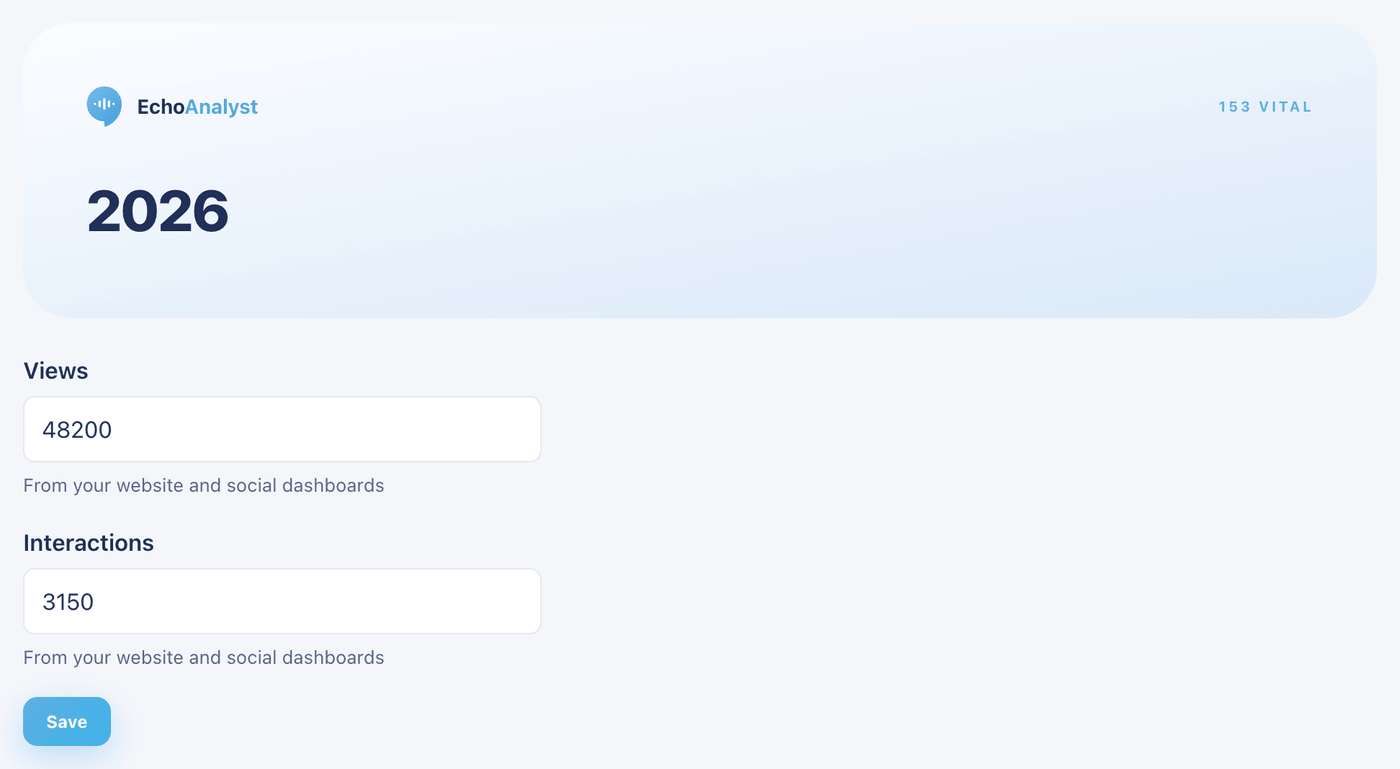
There is one pair of numbers per calendar year, the year your date range ends in. The report then shows them as Entered next to From Echo. The two are shown side by side and never added together.
Do not add Echo's widget views to your Google Analytics page views. A page that showed the widget is already one of your page views, so adding the two counts it twice.
Active faith journeys
A seeker becomes active in one of two ways.
| Kind | How a seeker gets there |
|---|---|
| Person-guided | Their turns with a person on your team reach 7. Turns add up across all of their conversations with you, not within one conversation. |
| Self-guided | They reply to 7 different text-list messages. Text messages report no opens or clicks, so a reply is the only sign that someone is reading. |
Each seeker is counted once, in the period they first became active, and in one group. Someone who did both is person-guided.
A turn is one back-and-forth: the seeker writes, and a person on your team replies. Automated replies and bots do not count. Six messages from a seeker followed by one reply from a responder is one turn. A reply that failed to send is not a turn.
Turns are counted when a conversation closes. A conversation that is still open adds no turns yet, and conversations closed before Echo began counting turns add none. A ministry with a long history may therefore see fewer active journeys in its first report than it expects.
Where journeys start
This table breaks the two middle numbers down by channel.
| Column | What it means |
|---|---|
| New touchpoints | First contacts that arrived on this channel. |
| New active | Seekers whose 7th turn came in a conversation on this channel. |
| Became active | New active as a percentage of new touchpoints on the same channel. |
Became active compares two counts within a channel. It does not follow the same people, because a seeker can start on one channel and reach 7 turns on another.
Phone calls count as touchpoints but have no messages, so they add no turns. The Calls row shows a dash for active seekers when there are none, since that is unmeasured. Self-guided seekers appear on their own row, Self-guided (text lists).
The evidence behind the numbers
This section shows how many of the conversations in the period were centered on the Gospel, as Echo Analyst read them.
| Line | What it means |
|---|---|
| Gospel presented | The share of analyzed conversations in which the Gospel was presented. |
| Full Gospel, all five essentials | Of the conversations that presented the Gospel, the share that carried all five essentials. |
| Analyzed N of M conversations | How many of the period's conversations have an analysis. Only closed conversations with enough back-and-forth are analyzed, so N is smaller than M. |
The touchpoint and active journey counts cover every conversation in the period, analyzed or not. The Gospel percentages cover the analyzed ones only. If nothing was analyzed, the percentages show a dash.
Decisions expressed in chat
This table sets two sources side by side for four things: Salvation prayers, Rededications, Church next steps and Gospel presented.
| Column | What it means |
|---|---|
| Marked by your team | Conversations where the responder chose a matching outcome when closing. |
| Seen by Echo Analyst | What Echo Analyst read in the analyzed conversations. Gospel presented is a percentage of them. The other three are counts. |
| Agree | Of the conversations your team marked, how often Echo Analyst saw the same thing. |
The two columns are never added together. Your team's mark leads, because the responder was in the conversation.
Echo matches your outcomes by their names. An outcome whose name mentions salvation or a profession of faith, rededication, church, or the Gospel is recognized. An outcome named for a workflow step, such as a transfer, is not. The note under the table says what percentage of your outcome-marked conversations used an outcome Echo recognizes. If Marked by your team is all zeros, that percentage usually explains it.
These are decisions a seeker expressed in a conversation. They are not a decision recorded on a form, and they are not a confirmed profession of faith. Report them as what they are.
Loyal people
The section headed Steps of a growing faith lists the steps behind the Loyal number, with how many people took each one. Most steps are things Echo Analyst saw a seeker say in a conversation, such as attending a church, being baptized or asking about baptism, serving, giving, praying for the ministry, or sharing their faith with others.
Joined a prayer list is different. It comes from your text lists, not from Echo Analyst. A list counts only when it is marked as a prayer list: on the auto-responder's settings in the new admin, tick Prayer list. Unsubscribing later does not undo the count.
Each seeker is counted once per step, the first time it came up, and once in the Loyal total.
Echo Analyst began recording these steps on a particular date for your ministry, and the note under the table names it. Conversations closed before that date contribute nothing, and the section does not appear at all until there is something recorded.
What is left out
- Spam and deleted conversations.
- Missed calls, and calls your team placed. Only an incoming call that someone answered is a touchpoint.
- A chat widget that was opened and abandoned, or a conversation your ministry started that the seeker never answered. Neither is a touchpoint.
- Text-list messages are not counted as Views. They go privately to one person and report no opens.
One more limit: a seeker who reaches you as two separate contacts, for example once on WhatsApp and once by web chat with nothing linking them, counts as two people.
What the terms mean
| Term | What it means here |
|---|---|
| 153 VITAL | The reporting format of the 153 Collective. VITAL stands for the five numbers: Views, Interactions, Touchpoints, Active, Loyal. |
| Touchpoint | A person's first contact with your ministry ever: a conversation they wrote in, or an incoming call someone answered. |
| Turn | One back-and-forth between a seeker and a person on your team. Bots and automated replies do not count. |
| Active faith journey | A seeker who reached 7 turns with a person (person-guided) or replied to 7 different text-list messages (self-guided). Counted once, ever. |
| Text list | An auto-responder campaign that sends messages to the people subscribed to it. |
| Loyal person | A seeker who took a step of growing faith, as seen by Echo Analyst or by joining a prayer list. |
| From Echo | A number Echo measured itself. |
| Entered | A number an admin typed in from the ministry's own website and social dashboards. |
| Analyzed conversation | A closed conversation with enough back-and-forth to have a stored Echo Analyst analysis. |
| Outcome | What a responder chooses when closing a conversation. |
If a number looks wrong
| What you see | What to do |
|---|---|
| No conversation data found | Open Sources in the Report Builder. It remembers your last choice, and an old selection can exclude everything. Then check the date range. |
| A note saying 153 reports by calendar year | Set the date range to January 1 through December 31 and run it again. |
| Views and Interactions show a dash | No chat widget activity was recorded in the period. The note at the bottom of the report gives the date widget counts start for your ministry. Earlier periods stay unmeasured. |
| Active faith journeys are lower than expected | Turns are counted at close, and only for conversations closed since Echo began counting. Close finished conversations, and expect earlier history to be missing. |
| Marked by your team is zero | Read the outcome percentage under the table. If your outcomes are named for workflow steps, Echo cannot match them to a decision. |
| New loyal people reads Not measured yet | Echo Analyst has not started recording these steps for your ministry. Nothing needs fixing. The number appears once conversations close after recording begins. |
| Joined a prayer list is zero | Check that the list is marked Prayer list in its auto-responder settings. |
| The numbers do not match the Conversations report | They count different things. This report counts people at a first contact or a threshold. The Conversations report counts conversations. See also The Harvest report for what happened after a decision. |