Facebook and Instagram are run by Meta, and Meta decides what a connected app like Echo may send, receive, and when. This article explains how the connection works, why a message or comment may not show up, and what the errors Meta sends back mean. The errors in this article come from Meta, not from Echo. Echo shows them so that you know what happened. Read it when a page shows a red X, a reply will not send, or a seeker says they wrote to you and nothing arrived.
For setup, see Facebook Integration and Instagram Integration.
Why Facebook and Instagram produce so many errors
Meta's messaging system produces more errors than most software connections. It enforces strict anti-spam policies and privacy protections that ordinary data connections do not have. A messaging request is also different from a typical request to a database. It depends on the real-time status and permissions of a third party, the person you are writing to. That person can block your page, close the chat, change their privacy settings, or delete their account at any moment, and each of these is a point where a message can fail. Meta also limits how fast and how often a page can send, and it can end a page's connection when it sees something it considers unusual.
That is why a message that worked yesterday can be refused today, and why the cause is often on the seeker's side or on Meta's, not in Echo.
Echo does its best to work within Meta's policies, so that as many of your messages as possible reach your seekers. When Meta does not allow a message through, Echo shows you the error Meta sent back, so you can see why a connection with that seeker is not possible.
How messages and comments reach Echo
The first and preferred way a message or comment reaches Echo is through a connection called a webhook. Meta sends Echo a notification the moment something happens on your page, so Echo does not have to ask. It is the fastest route. It is not the only one: Meta does not guarantee that every notification arrives, so Echo also checks for what a webhook may have missed. See the note below the steps.
- When you connect a page, Echo asks Meta to notify it about the page's messages, comments, posts, live videos, reactions and read receipts. It also asks to be told about messages your page sends from outside Echo, such as from Meta Business Suite.
- When a seeker writes or comments, Meta sends Echo a notification. Meta expects an answer within about five seconds.
- Echo puts the notification in a queue and turns it into a conversation, or a comment under its post. If Echo takes too long on one, it tries again after 5 seconds, then 1 minute, then 1 hour, and gives up after three retries.
- When you reply, Echo sends your reply to Meta through the Echo Global app linked to your page. Meta accepts it or refuses it. If Meta refuses it, Echo shows you Meta's reason.
Instagram uses the Facebook page's connection. An Instagram account in Echo is linked to a Facebook page, and the two share one login with Meta. If the Facebook page's connection breaks, the Instagram account tied to it is affected too.
Meta's own rules matter here too. If a webhook keeps failing, Meta sends the app an alert after 15 minutes and, after about an hour of failures, stops sending notifications until the app subscribes again. Echo manages its side of this for you. If a page you connected has gone quiet and the steps below do not help, disconnect and re-add the page, which subscribes it again.
Meta does not guarantee that every notification arrives, and it gives apps no log of the ones it did not deliver. Developers who build on Meta's messaging webhooks report occasional missing messages, most often on Instagram. For Facebook, Echo also polls Facebook, which means it asks Meta for recent conversations and fills in any message the webhook missed. It checks in-progress conversations every hour for the past day, and every day for conversations up to 7 days old.
Why a message or comment may not show up in Echo
Work down this list from the top. The first few are the most common.
| Cause | What to check |
|---|---|
| The page connection has expired | In Echo, go to Admin > Integrations > Facebook Services. A red X or a red skull icon next to the page means the connection is broken. Echo also emails your admins with the subject URGENT ACTION REQUIRED: Refresh Social Media Credentials. See "Reconnecting an expired page" below. |
| Another app controls the conversation (Conversation Routing) | If a bot, a marketing tool or another inbox is set as the default routing app, or is chosen in Social routing, Link routing or Campaign routing for your page or Instagram account, Meta can stop Echo from replying, and Echo may only get a message when that app hands it over. See "Conversation Routing" below. |
| A permission was switched off when connecting | When you log in with Facebook, every action Echo asks for should be Yes. If one was turned off, Echo reports it as a missing permission. Go through the connection again with all of them on. |
| The person connecting was not a full Admin | Editor and Monitor roles on the Facebook page are not enough. Connect with an account that has full Admin access on the page. |
| Instagram is not set up as Echo needs it | The Instagram account must be a Business account, linked to a Facebook page, and the Instagram app's Allow access to messages setting must be on. See error (#200) below. |
| The page is not in a permission set | Echo only shows a page's conversations to responders whose permission set includes that page. |
| The message never arrived from Meta | Echo's hourly and daily checks can fill in a message that Meta never delivered, for in-progress Facebook conversations up to 7 days old. They do not cover Instagram, and they cannot recover a message in a conversation older than 7 days or one that has been closed. |
Reconnecting an expired page
Facebook ends a page's connection when the person who connected it changes their Facebook password, removes the Echo Global app, or when Facebook sees suspicious activity on that account. Echo then stops sending to and receiving from the page until it is reconnected.
- Make sure someone who is an Admin on the Facebook page is logged in to Facebook, and that pop-up blockers are off.
- In Echo, go to Admin > Integrations > Facebook Services.
- Click Click here to login to Facebook.
- Agree to all of the permissions.
- Back in Echo, select the page from the list and add it again.
Once that is done, page activity and private conversations resume in Echo.
Conversation Routing: who is allowed to reply
Meta lets only one app at a time reply to a conversation. The app that is in charge is called the thread's owner, and the Meta setting that decides which app that is, is Conversation routing. It replaced Meta's older Handover Protocol, which had a Primary Receiver and a Secondary Receiver. Meta stopped supporting the Handover Protocol for Instagram on October 23, 2025, and moved every business to Conversation Routing.
This setting can stop messages from sending even when Echo is connected correctly, because Echo can be connected and still not be the app Meta lets reply.
You can open Conversation routing from two places. Both need an Admin of the Facebook page, and each shows part of the picture, so it helps to know both.
From Meta Business Suite
- Open Meta Business Suite on a desktop computer.
- Click Settings in the left-hand menu.
- Click Integrations.
- Select Conversation routing.
- Click the page or account you want to configure. For Instagram, choose the Instagram account.
- Go to the Routing tab.
What the Routing tab shows depends on whether routing has ever been set up for that page or account. If it has never been set up, you see a short explanation and a Set up button, with no paths listed. If routing has been set up, the tab lists each routing path (Campaign, Link and Social) and an Edit button. The Partner apps tab lists the apps connected to the page or Instagram account.
From Facebook
- Log in to Facebook as an Admin of the page.
- Open Settings & privacy.
- Click Page setup.
- Click Messenger conversation routing. For an Instagram account, click Instagram conversation routing, which is next to it.
The Messenger conversation routing page in Facebook has four sections:
| Section | What it does |
|---|---|
| Default routing app | Sends conversations to this app when no other routing app is selected for them. This is where Echo Global should be if Echo is replying. |
| Link routing | Sends conversations that start from messaging links to specific apps. |
| Social routing | Sends conversations that start from messaging entry points on Meta, such as your Facebook page, to specific apps. |
| Campaign routing | Sends conversations from messaging campaigns to specific apps. It is set up in Ads Manager. |
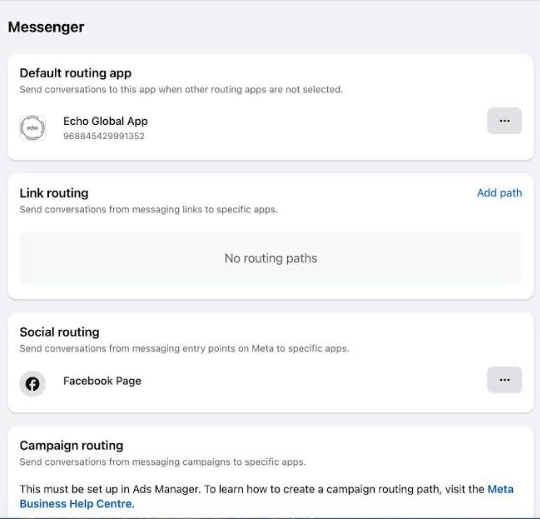
Because the default app only applies when no other routing app is selected, a path in Link routing, Social routing or Campaign routing that names a different app takes those conversations away from the default app. That is how a page can show Echo as its default app and still have some conversations go to another app.
What this means for Echo:
- If Echo Global is the default routing app and no routing path names another app, Echo can reply as usual.
- If another app is selected for the way a conversation started, Echo can still receive messages, but a reply may be refused with an error such as The action is invalid since it's not the thread owner. Echo cannot take control of the conversation back by itself.
- If you use a bot such as ManyChat in front of Echo, the bot should hand the conversation to Echo when a person needs to answer. See Using Meta's Conversation Routing (Handover Protocol).
Checking which app is in charge
- Open Conversation routing in Meta Business Suite (steps above), click the page or account, and go to the Routing tab.
- If routing has never been set up, the tab shows a Set up button and no paths. That means no Campaign, Link or Social path is sending conversations to another app. Do not click Set up unless you want to create a path.
- If routing has been set up, the tab lists each path with an Edit button. If a path sends conversations to an app other than Echo Global, those conversations will not go to Echo.
- Open the Partner apps tab to see which apps are connected to the page or Instagram account.
- Open Messenger conversation routing in Facebook (steps above), or Instagram conversation routing for an Instagram account. Under Default routing app, check that Echo Global App is the app, if Echo should be the one replying.
- For Instagram, check the Instagram account's own routing too.
- Send a test reply in Echo to confirm.
Be careful before you change which app is in charge. Other tools you use may stop receiving or replying to messages. Other messaging tools report that switching an Instagram account to Conversation Routing cannot be undone.
How Echo shows an error
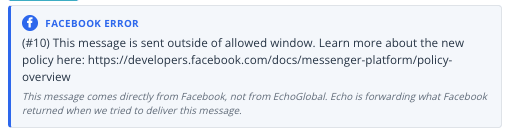
- A message that will not send. The message shows a notice with the platform's name (Facebook, Instagram or WhatsApp) and Meta's own wording. A short line under it says the error came from the platform, not from Echo.
- A refused Instagram message stays marked as an error. It is not shown as sent.
- A comment reply that fails. The post shows a notice with the platform's reason when it gives one, and the reply you wrote is put back in that comment's reply box.
- A message Echo cannot display. An Instagram message that Instagram marks as unsupported shows a note saying it cannot be displayed in Echo Global because of Instagram restrictions, instead of disappearing.
Error reference: direct messages
These appear when Meta refuses a message you send from Echo. Meta usually does not say which of several possible causes applies, to protect the seeker's privacy.
| What you see | What it means | What you can do |
|---|---|---|
| This person isn't available right now (code 551) | The seeker closed or deleted the chat, blocked the page, turned off messages from pages, deactivated or deleted their account, or limited who can message them. Facebook may also have suspended their account, and a bug or a slow connection can cause a temporary error. Echo cannot tell which, because Facebook does not say, to protect the seeker's privacy. | You may not need to do anything. Messaging from the Facebook page itself can sometimes start a new conversation request. Echo cannot, because it sends through the Echo Global app. |
| This message is sent outside of allowed window (code 10, subcode 2534022) | Echo uses Meta's Human Agent allowance, which gives every Echo customer 7 days to reply to messages and comments after the seeker's last message. This error means that time has passed, or Meta did not apply the allowance. | Check the date of the seeker's last message. If it was within 7 days, send it to support@echoglobal.org with the time. |
| (#10) Messaging permission check failure | The seeker's own settings do not allow messages from business pages, or the seeker deleted their profile. | You cannot fix this. A reply from the Facebook page itself may not get through either. |
| You have been temporarily blocked from performing this action (code 368) | Facebook has put a temporary block on your account, or has throttled your page for sending too many messages through apps, often promotional ones. A throttle affects every app connected to the page, not just Echo. Meta also sets sending limits based on how many people engage with a page, so a page with fewer engaged people reaches them sooner. | Echo cannot override it. Wait for it to lift, reply from Facebook directly, or dispute the block with Facebook. |
| This action is not permitted due to new data privacy regulation in Europe (code 10, subcode 2018336), or Unsupported attachment | Meta restricts some features in chats involving pages or people in Europe or Japan. | Take the attachment out and send it as a link. |
| You're restricted from acting as your Page until you complete Page Publishing Authorization (code 200, subcode 2424008) | Facebook requires an admin of a large page to confirm their identity before the page can reply. | Have each page admin complete Facebook's Page Publishing Authorization. To find which admin it is, have every page admin log in to Facebook and see who gets the Page Publishing Authorization notice. Once every admin shows as confirmed, delete the page in Echo Integrations and add it again. |
| Error validating access token (code 190, and subcode 460 when a password was changed) | The page connection is no longer valid. Echo marks the page as expired and emails your admins. | Follow "Reconnecting an expired page" above. |
| Unknown error or service temporarily unavailable (codes 1 and 2) | A temporary problem on Meta's side. | Try again in a few minutes. Meta's own advice is to retry with growing waits between tries. |
| The action is invalid since it's not the thread owner, or another app is controlling this thread (code 10 or 100, subcode 2534037) | Another app, or Meta Business Suite, holds control of the conversation. Meta lets only one app at a time reply to a thread. | Check Conversation routing: make Echo Global the default routing app if Echo should be replying, and check that Social routing, Link routing and Campaign routing do not send conversations to another app. If a bot is involved, follow its handoff steps. See "Conversation Routing" above. |
| Human agent tag is unavailable for this page/app | Reported by other messaging tools as a sign of a routing conflict, when more than one app is connected to the page and the one sending is not the default app. Echo has not confirmed that this exact message reaches you. | Check Conversation routing in Facebook, including Default routing app and Social routing, and remove connected apps you no longer use. |
| (#200) The account owner has disabled access to instagram direct messages (subcode 2534041) | Instagram's setting that lets connected apps read and reply to messages is off. | In the Instagram app, open Settings, then Messages and story replies, then Message controls, then Connected tools, and turn on Allow access to messages. Menu names can change. |
| (#230) Requires instagram_manage_messages permission | That permission was switched off when the account was connected. | Go through the connection again and leave every action set to Yes. |
Error reference: comments
These appear when you reply to, like, hide or delete a comment on a Facebook or Instagram post.
| What you see | What it means | What you can do |
|---|---|---|
| This comment no longer exists on Facebook (code 100, subcode 33; on Instagram, subcode 2018292) | The person who wrote the comment, or a page admin, deleted it. | Nothing. There is no comment left to answer. Deleting an Instagram comment that is already gone counts as a successful delete in Echo. |
| Object with ID does not exist, cannot be loaded due to missing permissions (code 100) | The comment was deleted, Echo is missing a permission, or the post's audience is restricted. Other tools that use Meta's comment API report the same message. | Check that the comment is still on the post. Then reconnect the page with all permissions on. |
| This app does not have the required permission for this endpoint | A permission was switched off when the page or account was connected. | Go through the connection again and leave every action set to Yes. |
| There was an error posting to this wall (Facebook) | Facebook's comment API does not accept replies to some second- and third-level replies, according to other tools that use it. Echo has not confirmed this limit. | Reply from Facebook directly. |
| Your Instagram comment was not added | Instagram's spam checks flagged the reply, often because it was very short, only emoji, or identical to others. | Reword the reply and avoid posting identical replies on many comments. |
| The Message option on a comment is missing | The comment is more than 7 days old, the comment is hidden or blocked, or the person's settings do not allow messages from pages. | You cannot send a private reply. Reply publicly on the comment instead. |
| Temporary block or throttle (codes 368, 1) | The same as for direct messages. Echo shows Facebook's message. | Wait and try again. |
Block on a comment hides that person's later comments in Echo and on your page. It does not stop them from using your Facebook or Instagram page. To block a person, do it from the page itself.
What the terms mean
| Term | What it means |
|---|---|
| Webhook | A message from Meta to Echo, sent the moment something happens on your page. It is how a new message or comment reaches Echo without Echo having to ask. |
| Notification | One webhook delivery. A single message or comment is one notification. |
| Page connection | The permission the Facebook account that connected your page gave Echo. It is also what Instagram accounts in Echo use. When it is invalid, the page shows a red X. |
| Human Agent | A Meta permission that extends how long a page can reply. By default, Meta gives apps only 24 hours to reply after a seeker's last message. Echo applied for the Human Agent permission and Meta granted it, so Echo customers have 7 days instead of 24 hours to reply to messages and comments. Echo warns you as a conversation nears the end of the 7 days. |
| Conversation routing | Meta's settings for which app is in charge of a conversation. It replaced the Handover Protocol. |
| Default routing app | The app Meta sends conversations to when no other routing app is selected for them. |
| Social routing | A section of Conversation routing that sends conversations from messaging entry points on Meta, such as your Facebook page, to specific apps. |
| Thread owner | The app that currently controls one conversation. Only the thread owner can reply to it. |
| Primary receiver, handover protocol | Meta's older way of doing the same job, with a primary and a secondary app. Many Echo articles and bot tools still use these words. |
| Private reply | A direct message sent to someone who commented on a post. It starts a new conversation, so Meta limits when it can be done. |
| Throttle | Meta slowing or stopping a page's sending for a while because it sent too much through apps. |
| Page Publishing Authorization | A Facebook identity check for admins of large pages. Without it, the page cannot reply or comment. |
If it is still not working
Email support@echoglobal.org with:
- Whether it is Facebook or Instagram, and the name of the page or account.
- The exact words of the error, copied from the notice in Echo.
- When the seeker wrote and when you tried to reply.
- Whether another app, such as a bot, is connected to the same page, and which apps are chosen under Conversation routing, including Social routing.