The Outcome Details report lists every conversation that ended with one outcome you choose, one row per conversation, with what the seeker and your team said and how many times the seeker had been in touch before. It answers "who were the people we recorded as, for example, Follow-up Requested, and what was their history with us?"
Running the report
- Open Reports from the main menu. In the left-hand menu, under Reports, click Outcome Details.
- Choose your dates, sources and, optionally, the Created At or Closed At switch, as on the other reports.
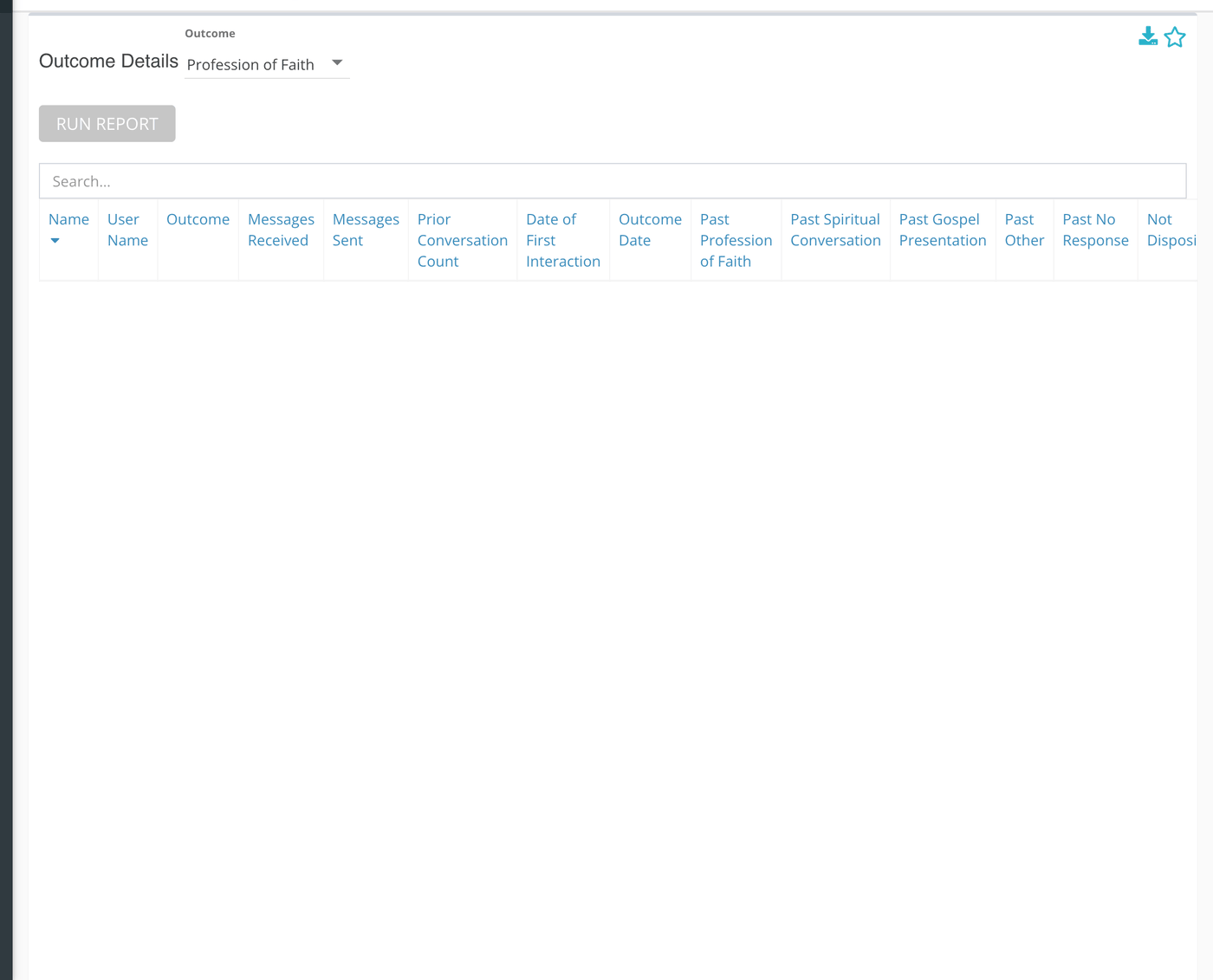
- On the card, open the Outcome list and choose the outcome you want to list.
- Click Run Report.
Choose the outcome before you run the report. The list may look empty, but the card does not start with a visible choice, and it queries outcome number 1 until you pick another. If your ministry has no outcome with that number the table comes back empty.
Larger date ranges can take a little while. Reports that are still being built are listed under Queue at the bottom of the left-hand menu, which reads "All Reports Finished Loading" when none are waiting.
Reading the table
One row for each conversation that ended with the outcome you chose, in the dates and sources you picked. Type in the search box to filter, or click a column heading to sort.
| Column | What it shows |
|---|---|
| Name | The seeker's name. |
| User Name | The responder who had the conversation. |
| Outcome | The outcome you chose. It is the same on every row. |
| Messages Received | How many messages your team sent this seeker, across all of their conversations up to the moment this one closed. "Received" is from the seeker's side. |
| Messages Sent | How many messages this seeker sent your team across the same conversations. |
| Prior Conversation Count | How many conversations the seeker had that began before this one closed. The conversation on the row is included, so a first-time seeker shows 1. |
| Date of First Interaction | When the seeker's earliest conversation began. |
| Outcome Date | When this conversation closed. |
| Past (outcome name) | One column for each outcome you use, headed "Past" and the outcome name. It counts the seeker's conversations to that point that ended with that outcome, the conversation on the row included. |
| Not Dispositioned | The seeker's earlier conversations that have no outcome. |
What the measurements mean
| Term | What it means |
|---|---|
| Outcome | The result a responder chooses when closing a conversation. Your ministry decides which outcomes exist. |
| Disposition | The record that holds a conversation's outcome and notes. A conversation without an outcome is Not Dispositioned. |
| Created At / Closed At | Which date puts a conversation in the period. Outcomes are chosen at closing, so Closed At is usually what you want. |
Things to know
- The Permission Sets choice does not narrow this report. The rows are every conversation with that outcome in the sources and dates you picked, whoever claimed it.
- Only your current outcomes are in the list. An outcome you have retired cannot be chosen.
- This report contains seekers' names and a view of their history. Share downloads with the same care as the conversations themselves.
Most cards also carry two small icons beside the title. The star pins the card to your Dashboard. The download icon saves the card as a CSV file, or as XLSX if your download preference is set to XLSX.