A provisioned number is a phone number that belongs to your Echo account. Seekers call it or text it; Echo answers. This screen lists every one you have and what each is allowed to do.
Where to find it
In the admin menu, click Phone Numbers.
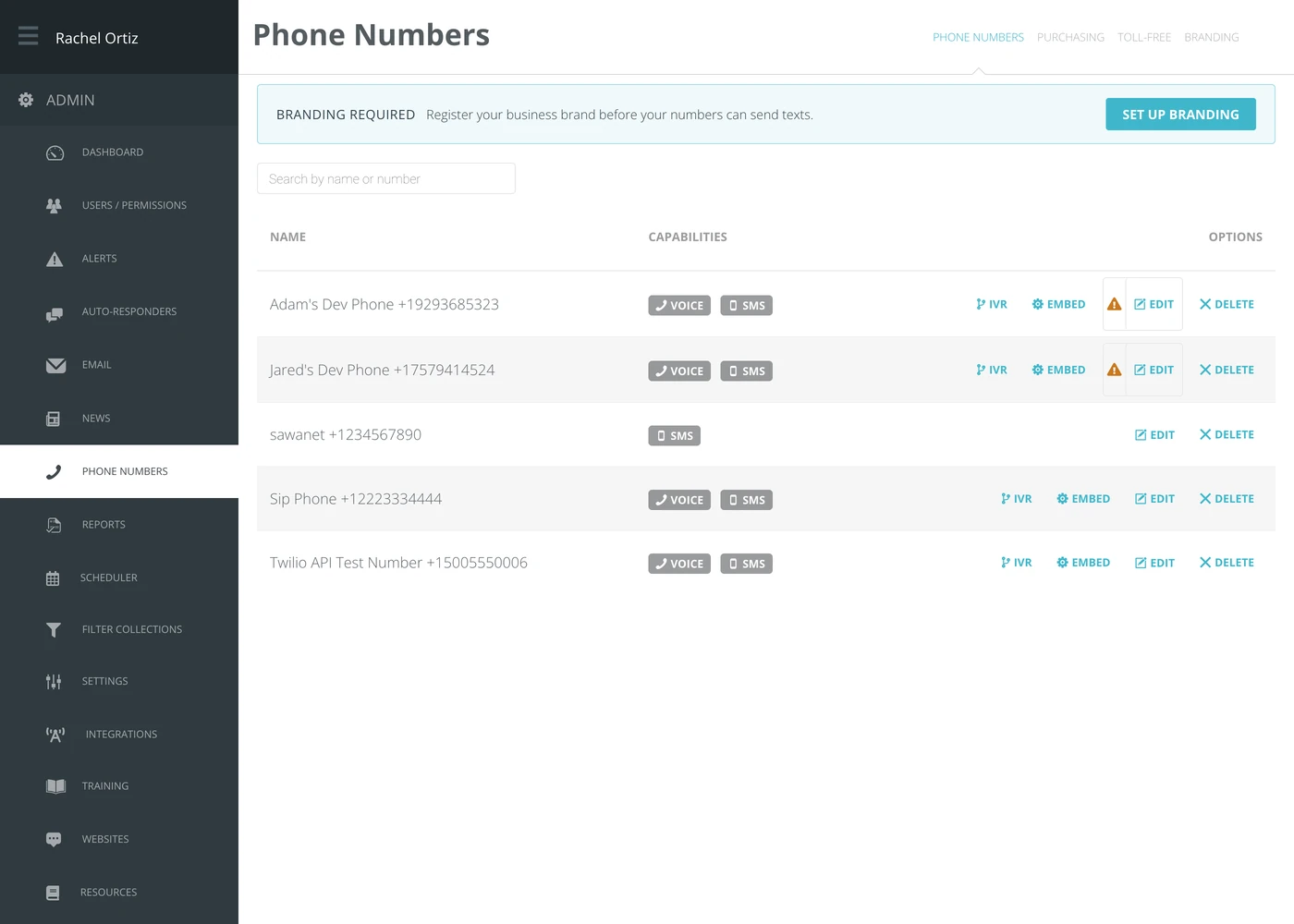
What the badges mean
Each number carries a badge per capability.
| Badge | What it means |
|---|---|
| Voice | The number can take calls. |
| SMS | The number can send and receive texts. |
| Toll-Free | The number is toll-free. Before it can text in the US it needs a toll-free verification rather than branding. |
A number can have one, the other, or both. Only numbers with SMS appear in the list of sending numbers on the one-off text screen.
The options on each row
| Option | What it does |
|---|---|
| IVR | Opens the call flow this number uses — what a caller hears and where the call goes. Only on numbers that take calls. |
| Embed | The code for putting a click-to-call button on your website. |
| Messages | On a short code, the automatic replies to STOP, HELP and START. |
| Toll-free Verification | On a toll-free number, opens its verification, or starts one if none has been filed. |
| Edit | Renames the number and changes its settings. |
| Delete | Removes the number from the account. |
A warning triangle beside Edit means that number can text but is not on an approved campaign yet. A clock in the same place means its campaign is waiting for carrier approval, and a circled cross means the campaign was rejected. Open Edit to choose the number's Campaign.
Branding, and why texts may not send
If you see BRANDING REQUIRED across the top of the screen, none of your numbers can send texts yet.

United States carriers require every business that sends texts to register who it is first. Until that is done, texts are rejected by the carrier rather than by Echo — which is why the messages simply never arrive and nothing in Echo looks broken.
Click Set Up Branding to start. Registration is filed with the carriers and takes time; start it well before you need the number.
The other tabs
| Tab | What it is for |
|---|---|
| Phone Numbers | The numbers you already have. This screen. |
| Purchasing | Getting a new number. |
| Toll-Free | Toll-free numbers, which are registered separately from ordinary ones. |
| Branding | Your business brand registration. |
What the terms mean
| Term | What it means |
|---|---|
| Provisioned number | A phone number belonging to your Echo account. |
| Capability | What the number is allowed to do — voice, SMS, or both. |
| Branding | Registering your organization with the carriers so your texts are delivered rather than filtered. |
| IVR / call flow | What a caller hears and what happens to the call. |
| Rep phone | A different thing — a number Echo rings to reach a responder, rather than one seekers call. See the Rep Phones article. |