Training Plan is the report that turns everything else into a decision. It ranks what to train on across the ministry, gives verbatim examples of the moments being missed, and names who needs it most.
The question the report itself names is: What should we train on, and who needs it most?
Running it
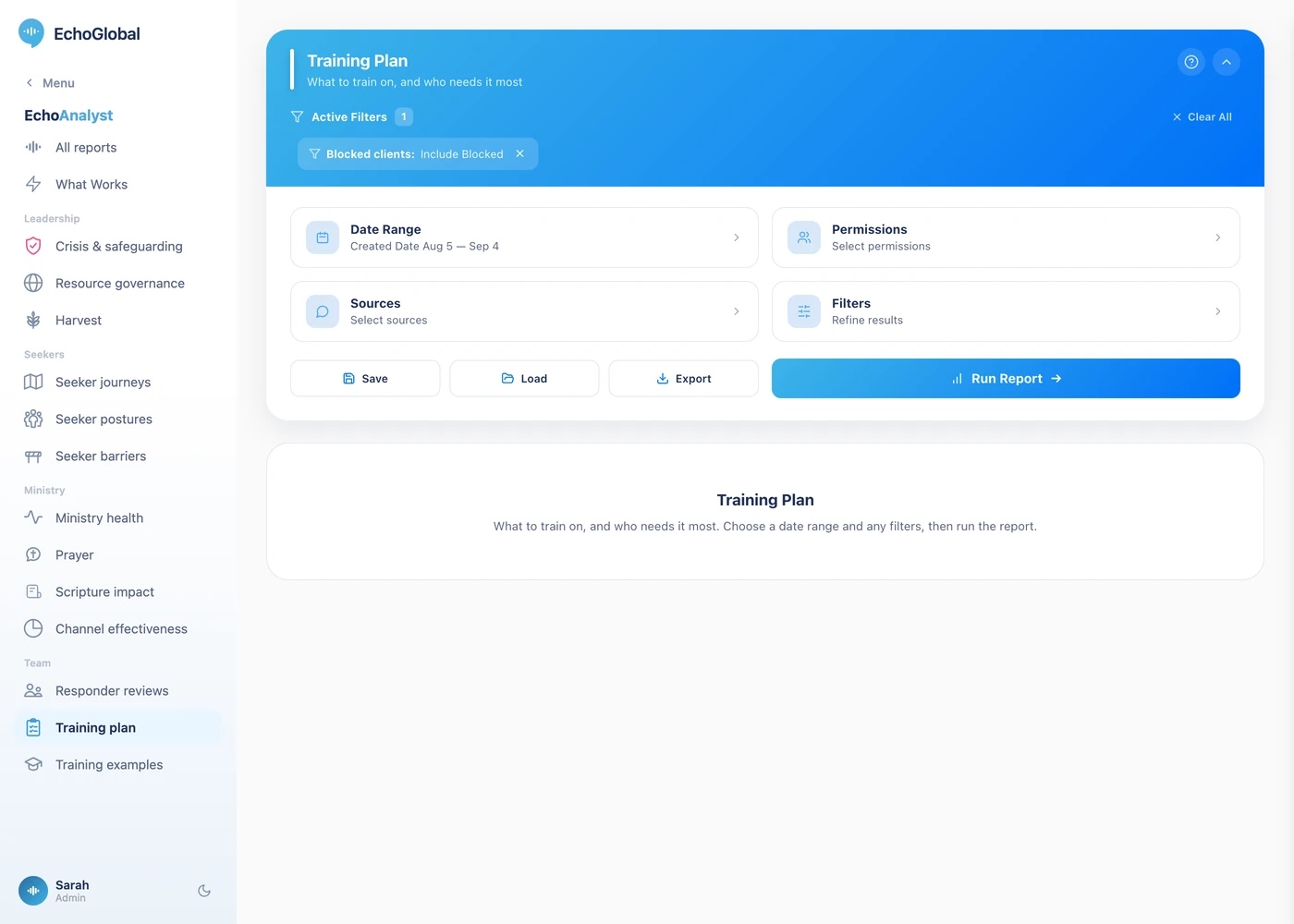
Open EchoAnalyst in the left-hand menu, then Training Plan. Set a date range, choose your sources if you want to narrow it, and select Run Report. Nothing is computed until you do.
The controls are the same on every Echo Analyst report. They are described once in Getting started with Echo Analyst.
What the page shows
A ranked list of training themes. The missed-moment themes carry real examples from your own conversations rather than generic advice.
Every theme carries a distribution of your rostered responders, below baseline, at baseline, strong, so the page reads the same whether you have twelve responders or two thousand. The named roster is the highest-leverage handful, with a count for everyone else.
Which teams need what appears when you have organized responders into two or more permission sets: a theme-by-team matrix.
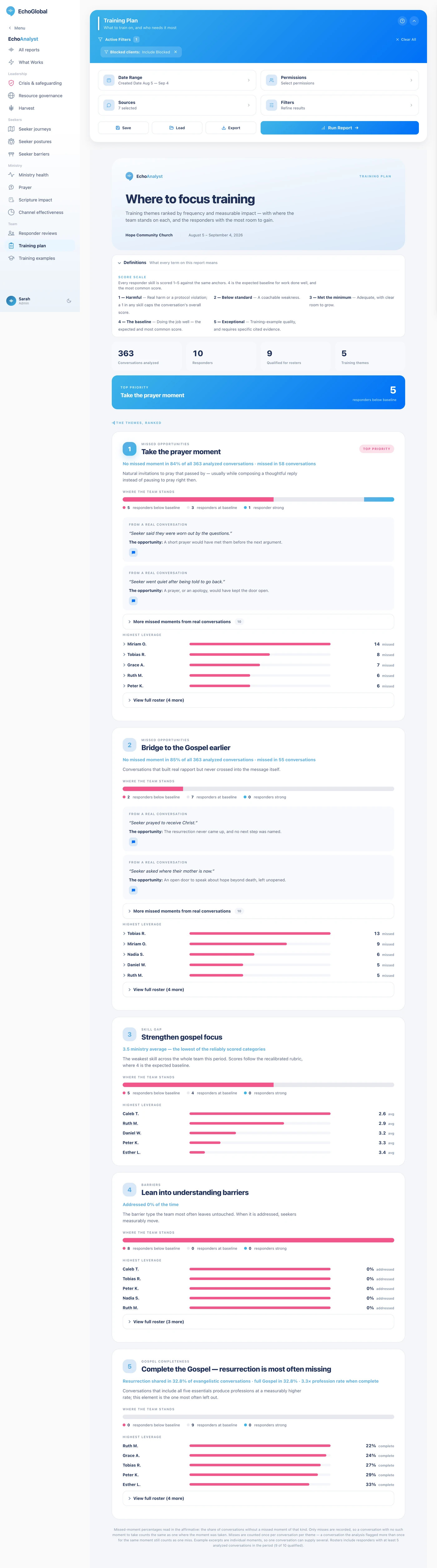
The report itself opens with a Definitions section carrying the same terms in short form, so you can check a word without leaving the page.
What the measurements mean
This report crosses every measure two ways: across the whole ministry, and again per responder. That is what lets it say both what to train and who needs it.
The measures
| Measure | What it is | How it is worked out |
|---|---|---|
| Theme | Something to train on. | A recurring pattern across conversations, a skill scoring low, a barrier going unaddressed, an opportunity repeatedly missed, a Gospel essential most often left out. |
| Below baseline / at baseline / strong | Where each responder sits on a theme. | It depends on the theme: against the ministry's own rate for a missed moment, and against a fixed line for a skill, a barrier or the Gospel. See the note below. |
| Roster | Who to start with. | The highest-leverage handful named, with a count for everyone else, so the page reads the same at 12 responders or 2,000. |
| Team matrix | Which teams need what. | Themes crossed with permission sets. Appears only when responders are in two or more sets. |
The 1–5 scale
Every skill score in Echo Analyst uses the same five points, and the wording matters. This is not a school grade where 5 is the target.
| Score | What it means | How often |
|---|---|---|
| 1 | Harmful, real harm or a protocol violation, such as missing a crisis or a doctrinal error | Rare |
| 2 | Below standard, a coachable weakness | Uncommon |
| 3 | Met the minimum, acceptable, with clear room to grow | Less common |
| 4 | Doing a good job, the expected baseline for someone doing the work well | Most common |
| 5 | Exceptional, training-example quality, and it requires specific cited evidence | Rare |
4 is the target, not 5. A team averaging 4 is doing the job well. A 5 has to be earned with evidence, so a page full of 5s would be a scoring fault rather than a triumph.
Two rules change how the number comes out. A 1 in any single skill caps the whole conversation's overall score, real harm is not averaged away by nine good things. And three skills return nothing at all when they do not apply: crisis sensitivity when there was no crisis, grace-filled truth when no hard truth was needed, and minors handling when no minor was involved. A blank is "not applicable", never zero.
Who appears, and who does not
A responder needs at least 5 conversations in the range before they are placed against a theme. Someone who worked two shifts will not appear, and that is correct rather than an omission. On a barrier theme a responder is placed only after meeting that barrier 3 times, and on the Gospel theme only after 3 evangelistic conversations.
"Below baseline" is measured against your own ministry's rate only on the missed-moment themes, where it means missing that moment more often than the ministry as a whole, so on a strong team, someone below baseline may still be doing good work. On the other themes it is a fixed line: a skill average below 3.5, a barrier addressed under 40% of the time, or the full Gospel in none of their evangelistic conversations.
How the percentages are worked out
Three habits run through every number on this page, and they explain most of the surprises.
- Rates are per measured conversation, not per conversation. Each measure counts only the conversations where that thing was assessed.
- An empty sample gives a blank, not a zero. Where you see "—", nothing was measured. A confident 0% over no conversations would be a false statement, so the report declines to make it.
- Percentages are never averaged together. When groups are combined, the underlying counts are added and the rate is recomputed. Otherwise a rare group of three conversations would weigh as heavily as a common one of three hundred.
Reading it honestly
A responder needs 5 conversations in the range before they are placed against a theme. Someone who worked two shifts will not appear, and that is correct rather than an omission.
If the team matrix is missing or empty, it is because your responders are not in two or more permission sets. The matrix has nothing to compare until they are.
On a barrier theme a responder also needs to have met that barrier 3 times, and on the Gospel theme to have had 3 evangelistic conversations, before they are placed.
If it comes back empty
Two things cause this, and neither means the report is broken.
The Sources filter remembers what you last chose. A selection made months ago can exclude everything you have added since. Open Sources, check what is ticked, and run it again.
Only closed conversations are analyzed. A conversation that is still open, or that was abandoned before your team replied, carries no analysis and appears in no number here. A busy period can still be a thin one for this report if most of it never closed.