Resource Governance asks a governance question rather than a performance one: what left the platform, does it align with what your ministry believes, and did the protective layer between seekers and responders hold?
The question the report itself names is: What left the platform, does it align with our doctrine, and what personal information was shared?
Running it
Open EchoAnalyst in the left-hand menu, then Resource Governance. Set a date range, choose your sources if you want to narrow it, and select Run Report. Nothing is computed until you do.
The controls are the same on every Echo Analyst report. They are described once in Getting started with Echo Analyst.
What the page shows
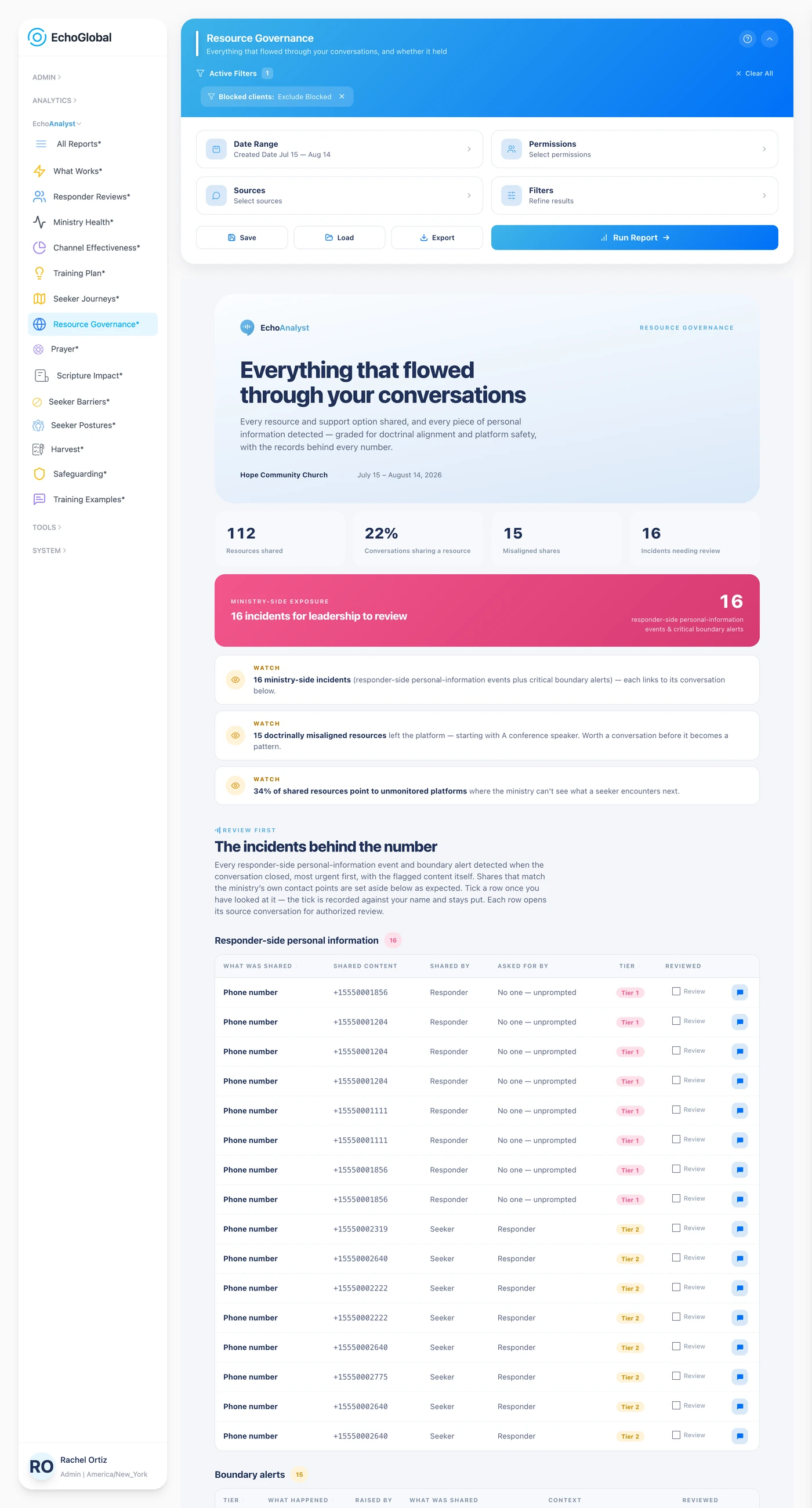
The incidents behind the number lists responder-side personal information, a responder sharing or asking for contact information, and protocol boundary alerts, one row per incident, and each can be marked reviewed.
What personal information was shared? is the complete log, including the routine cases of a seeker volunteering their own details.
Does what we share match what we believe? grades every resource a responder shared against conservative Christian doctrine: aligned, potentially aligned, misaligned, or unknown. Items a seeker shared are not graded. Most-referenced organizations and Everything shared, by type are the complete picture.
The report itself opens with a Definitions section carrying the same terms in short form, so you can check a word without leaving the page.
What the measurements mean
This report grades what left the platform. The vocabulary is governance vocabulary, not performance vocabulary.
Doctrinal alignment
| Measure | What it is | How it is worked out |
|---|---|---|
| Aligned | Consistent with conservative evangelical doctrine. | Graded per resource or referral by the conversation's analysis. |
| Potentially aligned | Broadly compatible, with something to note. | Worth a look rather than an alarm. |
| Misaligned | Conflicts with conservative Christian doctrine. | The rows to read first. |
| Unknown | Could not be graded. | Counts as needing review, not as fine. |
The other measures
| Measure | What it is | How it is worked out |
|---|---|---|
| Personal information shared | Responder-side exposure. | A responder giving out a personal phone number or email, recorded per incident with a priority tier. |
| Boundary alerts | The protective layer between seeker and responder. | One persisted row per incident, each markable as reviewed. |
| Organizations referenced | Who you are sending seekers to. | Ranked by how often they were referenced. Capped at 15. |
| Everything shared, by type | The full picture. | Every resource and referral, grouped by kind. Capped at 500 rows. |
The two incident sections are forward-only. They come from records written when a conversation closes, so conversations that closed before that detection existed have no rows, and there is deliberately no fallback that re-derives them from older analyses. An empty section means a clean period or an unscanned one. Read it against when detection started.
Review grades, misaligned, potentially aligned and unknown, are what the report treats as needing a person. "Unknown" being on that list is deliberate: ungraded is not the same as safe.
Reading it honestly
The two incident sections are forward-only. They come from records written when a conversation closes, so conversations that closed before that detection existed have no rows, and there is deliberately no fallback that re-derives them.
An empty incident section therefore means one of two things: a clean period, or a period before detection was running. Read it against when detection started, not on its own.
Lists are capped at 500 rows, and the organizations table at 15.
If it comes back empty
Two things cause this, and neither means the report is broken.
The Sources filter remembers what you last chose. A selection made months ago can exclude everything you have added since. Open Sources, check what is ticked, and run it again.
Only closed conversations are analyzed. A conversation that is still open, or that was abandoned before your team replied, carries no analysis and appears in no number here. A busy period can still be a thin one for this report if most of it never closed.